
FairCom DB Supports both single-user environments and multi-user environments. This section explains some of the most significant differences between coding applications for these environments.
Multi-User Updates
The most significant difference between coding applications for single-user environments and multi-user environments (including local area networks) has to do with performing record updates (rewrites) and record deletions.
The basic problem is that to perform a rewrite or a deletion in a multi-user system, you must own a record lock on the record of interest. However, one must be careful to help ensure that locks are held for the shortest time possible.
There are two basic approaches to avoid prolonged data record locks:
- In the first method, do not acquire a data record lock until the user has completed all updates on the record in a local buffer. This approach requires three record buffers: one for the current ISAM record, for which no data record lock has been requested; a second to hold the updated record; and a third to reread the current ISAM record with a
LockISAM()request when the updates have been completed. If you cannot get the lock on this reread, or if the contents of the reread buffer do not agree with the contents of the original current ISAM buffer, the operator must be informed that the update could not be accomplished. - In the second method, acquire a data record lock when the user reads the record to begin the update process. If the updates are not completed in a specified time interval AND if the operator cannot acknowledge that updates are still desired, then release the record lock(s) and cancel the update session. This requires real-time control of the data input process, which may not be available.
Examine how the change function is used to delay getting a record lock until the rewrite or delete has actually been committed.
If either of the two above approaches is not used, then the application typically uses a scheme in which the lock is acquired when the user reads the record in preparation to update the record AND it does not relinquish the lock until the update is completed no matter how much time is required. The classic problem that arises with this technique is when an update is interrupted (say by the updater going to lunch). Then a lock is held for a (relatively) long time on the data record, blocking other users from update requests on the same record.
Multi-User Interference
While true multi-user interference is rare, in multi-user applications, it is possible for one process to interfere with another process even when all the proper locking strategies are in place. In particular, one user may cause a change in a data record during the time another process is searching an index and securing a data record lock on the same record. If this happens, FairCom DB detects significant changes and will automatically retry the operation that received the error. The number of times an operation is retried is specified by the value ITIMretry in file ctopt2.h. The default value of 10 may be altered. If the error persists after the specified number of tries, an ITIM_ERR (160) is reported.
If error ITIM_ERR is returned by an ISAM function and is reproducible, this may be an indication of improper current ISAM settings during rewrite operations. See ReWriteRecord for more information. Another possible cause of the ITIM_ERR is a problem in the data possibly caused by failing to close the file properly or memory overwrites by the application. It can also result from index file corruption.
- The
ITIM_ERRdetects two types of changes to the record being accessed: - The record has been deleted
- The key value has changed
Multi-User File Mode
When opening a file you can specify the type of shared user access by including the appropriate value in the filmod parameter.
The available file modes are ctEXCLUSIVE, ctSHARED, and ctREADFIL, which can be used with the other file mode parameters. An ctEXCLUSIVE file can only be opened by one user; a ctSHARED file can be opened by multiple users for concurrent read/write access; and a ctREADFIL can be opened by multiple users for read-only access. Two additional file modes, ctCHECKLOCK and ctCHECKREAD, affect record locking, but are specified at the time the file is opened or created in addition to ctSHARED file mode. ctCHECKREAD is available only if you use the FairCom Server, and is discussed in “FairCom DB Database Engine”.
Note
ctCHECKLOCKandctCHECKREADshould not be applied to index files.
ctEXCLUSIVE
If a file is opened with a filmod of ctEXCLUSIVE, that file can only be opened by one user. If another user already has the file open in any mode, this user cannot open the file as ctEXCLUSIVE. Once this user has the file opened as ctEXCLUSIVE, no other user can open it. Reads and writes are cached for index files opened with this file mode since there are no integrity issues with only one process in the file.
To support EXCLUSIVE file opens under most Unix systems, add the following line to ctree.mak file or ctopn.h prior to building your library:
#define ctLOCK_EXCLUSIVEfilectSHARED
Opening a file with a filmod of ctSHARED allows multiple users to have both read and write access to the file. If a user tries to open a file as ctSHARED and another user has the file open as ctEXCLUSIVE or ctREADFIL, this user cannot open the file. Once a user has a file open as ctSHARED, other users can open the file as ctSHARED but not as ctEXCLUSIVE or ctREADFIL.
Note All files are created in
ctEXCLUSIVEmode, even ifctSHAREDwas in the file mode. Newly created files must be closed and opened again to be shared.As of version 13.0.3, only the creator of a transaction-dependent file can open it in shared mode before the associated transaction commits. Once the transaction commits, the file automatically transitions to shared mode for all users.
In versions before 13.0.3, shared mode was not usable before the transaction was committed.
ctREADFIL
Use this mode if you wish to have multiple users read the file, but you want to prevent them from being able to update the file. A file can only be successfully opened with ctREADFIL if no other process has the file open in ctSHARED or ctEXCLUSIVE mode. Reads are cached for files opened with this file mode. The concept of ctREADFIL is supported by all FairCom Servers and non-Unix FPUTFGET environments. FPUTFGET environments rely on the native operating system interpretation of ctREADFIL, which in Unix typically allows any user to access the file with any file mode (i.e., ctSHARED), but limits ctREADFIL users to read only.
Record Locking
Record locking controls which user is going to be able to access and update a given record. When multiple users are accessing a data file in ctSHARED file mode use record locking to prevent several users from updating the same record at the same time. For low-level functions, use LockCtData(). For ISAM functions, use LockISAM().
FairCom DB provides optimistic and pessimistic record locking.
- All FairCom APIs can use optimistic locking for record updates, which provides the best scalability.
- SQL automatically locks records as needed, which provides good scalability.
- The record buffer APIs provide complete control over all locking, which includes optimistic locks and a wide variety of pessimistic record locking mechanisms.
All types of record locks are compatible across all APIs, allowing data to be processed safely by all APIs simultaneously.
In FairCom DB, we define two types of record locks: write locks and read locks.
Write Locks
A write lock can be considered an exclusive lock. Only one user can have a write lock on a given record. A write lock also prevents anyone from getting a read lock on the same record. This is used when a user must update a record, and needs to prevent other users from updating at the same time. Use the record lock mode of ctENABLE.
Read Locks
A read lock can be considered a shared lock. Any number of users can have a read lock on a record simultaneously. A read lock on a record will prevent another user from getting a write lock on this record. Use this to allow one or more users to look at a record while ensuring that it cannot be changed or deleted by another user while they are looking at it. Use a record lock mode of ctREADREC.
The FairCom DB client and the FairCom Server DO support read locks in addition to write locks.
Optimistic Locking
The FairCom database supports optimistic locking in all APIs: JSON DB, SQL, CTDB, and ISAM. Use optimistic locking for maximum scalability and performance. Optimistic locking allows an application to read a record without locking a record. This feature improves application performance as concurrent users increase.
Optimistic locking requires a changeid field to be in a table. This field identifies when a record changes. This field is typically named changeid. You may assign the changeid attribute to any field. You may designate only one field in a table as a changeid field.
When a record is inserted or updated, the server sets the changeid field to the current transaction number. The value of the changeid identifies which transaction changed a record. Each change to a record is guaranteed to have a new transaction number. Thus, the value of the changeid field changes with each update to a record.
When an application updates a record, it includes the changeid field and sets it to the value it previously read. The server checks the value of the changeid field. If the value in the record matches the value in the update, the record has not changed, and the server applies the update. If the changeid value in the record does not match, another user has changed the record, and the server returns an appropriate error.
When an application wants to force an update without change protection, it omits the changeid field from the update or assigns NULL to the changeid field. The server unconditionally updates the record without checking for changes made by other users.
Optimistic locking does not conflict with pessimistic locking because the server always returns an error when another user has put a read or write lock on the record.
LIMITATIONS: This feature is only supported in client/server mode for the following reasons:
- The single user standalone model doesn't support this feature because it only supports a single connection accessing a table at one time.
- The multi-user standalone model does not support this feature because it does not support transaction control, and this feature uses the current transaction number as the change ID value.
See also
addChangeIDfield(), delChangeIDfield(), getChangeIDfieldNumber(), getChangeIDheaderValue(),
Checklock
FairCom DB does not force you to acquire write locks before updating a record. It is up to you to use LockISAM() or LockCtData() in a manner that preserves data integrity. Updating a record without first obtaining a write lock runs the risk of having multiple users trying to update the record at the same time. If two users try to write to a record at the same time, the first value written will be overwritten by the second, and the validity of the data is compromised.
The ctCHECKLOCK file mode has been provided to aid you in this matter. If you OR it in with the other file mode values when you open or create a file, FairCom DB will require that you have a write lock on a record before it can be updated. If you do not, then the update function will return an error code of DADV_ERR (57).
If you specify ctCHECKLOCK when the file is created, that mode will be invoked every time you open the file. It becomes a permanent part of the file’s attributes. If it was not specified at file creation, you can OR in the value at file open.
As discussed in “Data Integrity”, when using transaction processing, you can automatically invoke LockISAM() for all ISAM update functions by OR-ing a lock mode into the argument of the Begin() function.
ctCHECKLOCK can be used in multi-user standalone (FPUTFGET) mode.
Note In V13.0.3 onwards, we enable
ctCHECKLOCKon all files by default. You can change this behavior using AUTO_CHECKLOCK.
ctCHECKLOCKandctCHECKREADare intended as debugging aids to help developers to identify code locations where locks are not being acquired.
ctCHECKREADis not compatible withctSUSPENDbecausectSUSPENDwill disable record lock acquisition without releasing existing locks, so any record read would then trigger thectCHECKREADerror condition.
ctCHECKLOCKandctCHECKREADshould not be applied to index files.
ISAM Level Data Record Locks
LockISAM() is designed to enforce the classic two-phase locking protocol, helping ensure multiple users make consistent updates. The two-phase protocol states that a transaction should never unlock a data record until it is done acquiring all the locks it needs for the entire transaction. In other words, there is a phase during which a transaction acquires record locks and does not free any locks and a second phase during which the transaction relinquishes locks and does not acquire any new locks.
When we refer to a transaction in this discussion, we are NOT referring specifically to Transaction Processing as described in “Data Integrity” on the FairCom Server. We are talking about any group of related actions when accessing a database. The concept discussed here, however, does apply to Transaction Processing as well.
ctENABLE
With LockISAM(), the first phase is initiated when LockISAM() is called with the ctENABLE parameter. All subsequent record read operations first acquire a write lock before proceeding. As you can see, you will only need to do one LockISAM() call with the ctENABLE parameter to lock a number of records. If a subsequent call cannot get an appropriate lock on the record, that function will return a value of DLOK_ERR (42).
Note
LockISAM()withctENABLEdoes NOT lock records, but enables record read operations to acquire locks.
ctENABLE_BLK
If you use ctENABLE, and a lock cannot be obtained, the calling function returns with an error code. ctENABLE_BLK is the same as ctENABLE, but a process unable to get a write lock is “put to sleep” until the lock is available. Use this with caution.
ctREADREC
Use ctREADREC instead of ctENABLE to specify read locks. Switch from ctENABLE to ctREADREC by another call to LockISAM() using the ctREADREC mode.
ctFREE
The second phase is essentially one operation that occurs when LockISAM() is called with the ctFREE parameter. All ISAM record locks currently held by this application are released a single function call.
ctRESET
LockISAM() with ctRESET is equivalent to two calls to LockISAM(), the first using ctFREE and the second with ctENABLE. This is of value when you are traversing the data file in key sequential order. After each update the previous locks are freed and new locks are enabled for the next transaction.
ctSUSPEND, ctRESTORE, ctRESTORED, and ctRESTORE_BLK
There may be situations during the first phase when it is desirable to read some records without acquiring locks on them, because these records will not be updated. In such cases, call LockISAM() with ctSUSPEND to temporarily disable automatic record locks. When the application is ready to begin reading records with locks again, call LockISAM() with the ctRESTORE parameter (or ctRESTORE_BLK to restore ctENABLE_BLK). Note that this does not violate the first phase restraint of only acquiring locks since no locks are freed in the ctSUSPEND mode. To return to the locking mode with read locks active instead of write locks, call LockISAM() with the ctRESTRED parameter. See “LockISAM” in the function reference section.
ctGETLKISAM
Returns the current LockISAM() state. See “LockISAM” for more information.
Using LockCtData with LockISAM
You can use the low-level locking function LockCtData(), as described below, to relax the constraints of the “two-phase” protocol. Specific records can be locked or unlocked. Note, however, that a record locked with LockCtData() will NOT be freed with a LockISAM() with ctFREE call.
LockISAM and Resources
Resource records, (see “Resources”), locked with UpdateCtResource() or GetCtResource() are NOT unlocked with LockISAM() and ctFREE.
Recursive Locking Support
Introduction to Recursive Locks
FairCom introduces an advanced locking feature of Recursive Locks. A recursive lock is a lock applied to a record by a user already owning the same lock on the same record, and such an additional lock request is “counted.” For middle code that does not have a means to know the context of what has already been done to a record, the recursive lock offers the ability to lock and unlock a record without worrying whether the unlock will strip a needed lock obtained outside the current c-tree context.
Recursive locks are typically useful for an application that must make LOCK and UNLOCK calls without knowledge of already existing locks on the same record by the same application.
Consider a user making more than one lock call for the same record. With the previous c-tree locking mechanism, this would have no effect on the record’s lock state. For instance, assume the following sequence of calls is from a single user (and for simplicity we assume the file is not under transaction control):
LOCK Record A
LOCK Record A
UNLOCK Record A
UNLOCK Record A
The second LOCK would return no error yet have no effect. However, the first UNLOCK would release the lock and the second UNLOCK would return an error.
Modifying the above example, we illustrate the effect with Recursive Locks enabled:
RECURSIVE LOCK Record A
RECURSIVE LOCK Record A
RECURSIVE UNLOCK Record A
RECURSIVE UNLOCK Record A
Here, the second RECURSIVE LOCK returns no error, and the recursive lock count on the record is incremented to 2. The first recursive UNLOCK will not release the lock, but simply decrement the recursive lock count to 1, and return NO_ERROR. The second recursive UNLOCK will then release the lock and return success (NO_ERROR).
Recursive Locking Mode
Recursive locks must be requested explicitly through a lock mode. An application that does not explicitly request recursive locks will behave the same as it did without recursive lock support. The following API calls support OR-ing in a recursive lock mode bit, ctLK_RECR: TRANBEG(), TRANEND(), LKISAM(), and LOKREC(). For example, LKISAM(ctENABLE_BLK | ctLK_RECR) would request blocking, recursive write locks on each record accessed at the ISAM level.
A TRANRST() called to return to save point N causes recursive lock and unlock calls made since save point N to be undone. For example:
TRANBEG(ctENABLE | ctLK_RECR)
LOCK Record A
SAVEPOINT #1
LOCK Record A /* increase recursive count to 2 */
TRANRST to savepoint 1
results in record A to have a recursive lock with a count of 1.
Mixing Recursive and Non-recursive Locks
While it is not recommended, mixing recursive and non-recursive locks has the following effects:
- If an existing non-recursive lock is followed by a recursive lock, then the existing lock is promoted to a recursive lock with a recursive lock count of 2.
- If a recursive lock is followed by a non-recursive lock, the non-recursive locks has no effect and returns
NO_ERROR. - If a non-recursive unlock call is made to a recursive lock, it causes the lock to be released (ignoring the recursive status).
Mixing Recursive Read and Write Locks
Scenario A: A user holds recursive write lock(s) on Record A and then issues a recursive read lock request on Record A: the recursive read lock request returns success (NO_ERROR), but the lock remains a write lock with its recursive lock count incremented. This behavior is necessary since the existing recursive write locks cannot be arbitrarily changed to a read lock since they are still being held.
Scenario B: A user holds recursive read lock(s) on Record A and then issues a recursive write lock request on Record A: the recursive write lock request returns success (NO_ERROR) and the lock is changed to a write lock if no other read locks are being held by other users, and the recursive count is incremented; or the write lock returns failure if other users do hold read locks on Record A, and the existing read lock(s) for the user remains and the recursive count is unchanged.
Due to the existing nature of the system lock tables within FairCom DB, there is virtually no extra overhead to apply the recursive lock count.
ctThrdSharedCritical API for Scalable Read Locks
This release extends the threading API for reader/writer lock support that allow uncontended read locks for excellent speed and scalability. Shared lock performance should scale linearly. Exclusive lock performance is expected to be slower than alternatives.
NINT ctThrdSharedCriticalInit(ctSCRIT * scrit)Initializes the shared critical pointed to by scrit.
Returns 0 on success.
NINT ctThrdSharedCriticalEnter(ctSCRIT * scrit, volatile RESERVATION * ticket)A shared lock of scrit. Each calling thread must have a unique RESERVATION they provide to each scrit. There are multiple restrictions on ticket:
- The RESERVATION must initialize as shown prior to first calling this function:
*ticket = CRIT_UNRESERVED - Behavior is undefined if the RESERVATION is modified at any time after first use and prior to calling
ctThrdSharedCriticalCancelReservation - Behavior is undefined if ticket becomes invalid memory prior to calling
ctThrdSharedCriticalCancelReservationfor thisscritandticket. - Behavior is undefined if
ticketis used by a different thread. - Behavior is undefined if the thread exits without calling
ctThrdSharedCriticalCancelReservationfor thisscritandticket.
Behavior is undefined if called recursively.
Waits indefinitely if an Exclusive lock is in effect.
Note False sharing of RESERVATION memory could impact scalability.
Returns 0 on success.
NINT ctThrdSharedCriticalExit(ctSCRIT * scrit, volatile RESERVATION * ticket)Releases the shared lock of scrit. The same ticket passed by this thread to ctThrdSharedCriticalEnter must be used.
Returns 0 on success.
NINT ctThrdSharedCriticalCancelReservation(ctSCRIT * scrit, volatile RESERVATION * ticket)Releases resources in scrit associated with ticket. This must be called prior to thread exit once a particular ticket has been passed to ctThrdSharedCriticalEnter.
Returns 0 on success.
NINT ctThrdSharedCriticalEnterExcl(ctSCRIT * scrit)An exclusive lock of scrit. Behavior is undefined if called recursively.
Returns 0 on success.
NINT ctThrdSharedCriticalExitExcl(ctSCRIT * scrit)Releases an exclusive lock of scrit.
Returns 0 on success.
NINT ctThrdSharedCriticalTerm(ctSCRIT * scrit)Releases resources used by shared critical. Behavior is undefined if scrit is still in use by other threads.
Diagnosing Lock Issues
Two functions are available to assist developers and administrators in identifying lock issues. Unnecessarily long held record locks are frequently identified as the culprit. It is useful to identify the owner of the record lock to determine the nature of these locks. The following API functions are available to assist in building tools for identifying these issues.
LockDump()LockList()
Low-Level Data Record Locks
Record locking controls which user is able to access and update a given record. There are four basic locking modes: ctENABLE, ctENABLE_BLK, ctFREE, and ctREADREC. These modes have the same meaning as with the LockISAM() function.
The LockCtData() function is used when using low-level functions to access the database. LockCtData() differs from LockISAM() in that it affects only a single record, as specified when the LockCtData() function is called.
ctENABLE
Places a write lock on a given record. Only one user can have a write lock on a given record. It also prevents another user from getting a read lock. This is used when a user wants to update a record, and wants to prevent any other user from updating at the same time. You can think of this as an exclusive record lock.
ctENABLE_BLK
This is the same as ctENABLE, but the process will “go to sleep” until the lock is granted. With ctENABLE, if a lock cannot be granted, LockCtData() returns error code DLOK_ERR (42). With ctENABLE_BLK, FairCom DB waits until the other user releases the lock so that you can obtain it. This should be used with caution. If FairCom DB detects a dead lock situation, error DEAD_ERR will be returned. For example, if User A has a lock on record 1 and is waiting for a lock on record 2, while User B has a lock on record 2 and is waiting for a lock on record 1, they are deadlocked.
ctFREE
Use this lock mode to release a lock on a specific record.
ctREADREC
This is a read lock. Any number of users can have a read lock on a record simultaneously. This ensures that no other user can acquire a write lock on the record. Think of this as a shared record lock. However, a single write lock prevents any read locks from being acquired.
ctREADREC_BLK
This is the same as ctREADREC except that with the FairCom Server, a process not able to get a read lock will “go to sleep” until the lock is available.
FairCom Server enhanced locking control for files opened multiple times in the same connection
Starting in V10.3, FairCom DB supports opening the same file multiple times in the same connection assigning a different file number to each file or, in FairCom DB API, a different file handle. This can be useful in situations where you want to allow the same file to be opened twice by the same thread with different locking attributes applied to each thread.
Each of these sibling files is referred to as a "co-file." For example, if the file customer.dat is opened in the same connection using file numbers 5 and 10, then we say that file 5 is a co-file of file 10, and vice versa.
In this case there are considerations about how locks interact within the same connection when operating using different co-files. For example, if a write lock is acquired on a record R using file number 5 within the same connection, what is the behavior of trying to acquire a lock on R using co-file number 10?
In this example, before this enhancement, FairCom Server behaved as follows:
The lock on R issued with co-file number 10 succeed and is considered a "secondary lock", while the lock acquired first (using file number 5) is considered "primary."
The difference in the locks manifests itself during calls to unlock the record: If the primary lock is unlocked first, then the primary lock and all the corresponding locks on co-files are removed. But if a secondary lock is unlocked before the primary lock is unlocked, then only the secondary user lock is removed; and the primary lock is maintained.
Any other connection saw the record locked until the primary lock was released.
This previous behavior has been maintained and it is the system-level default behavior.
It is now possible to configure the behavior choosing among 4 different options:
-
NODIFUSR: The default as described above. -
DIFUSR: Locks on co-files are considered as acquired from a different connection, so the lock on R issued with co-file number 10 will fail. -
SAMUSR_M: Locks on record R on co-files are considered as the same lock acquired on the same file, so lock on R issued with co-file number 10 succeeds. As soon as the lock is released in one of the co-files that successfully requested the lock, the lock is released. Therefore, before acquiring the lock on R using file number 10, the lock can be released only using file number 5, but after acquiring the lock on R using file number 10, the lock can be released either by using file number 5 or 10. -
SAMUSR_1: Locks on record R on co-files are considered as the same lock acquired on the same file, so lock on R issued with co-file number 10 succeeds. As soon as the lock is released in one of the co-files (whether or not the lock was requested using the co-file) the lock is released. Therefore, even before acquiring the lock on R using file number 10 the lock can be released either by using file number 5 or 10.
Recursive locks are not supported for co-files. An attempt to open a co-file when recursive locks are pending on the underlying file will fail with the error MUOP_RCR (998). An attempt to issue a lock on a co-file with the ctLK_RECR bit set in the lock mode will fail with the error MLOK_ERR (999).
Read locks behave in a manner consistent with write locks. The notable issues are:
- With
DIFUSR, read locks can be issued for different co-files; and unlocking one co-file's read lock does not remove the read lock from any other co-files that requested the read lock. - With
DIFUSR, a read lock on a co-file cannot be promoted to a write lock if other co-files have read locks; a non-blocking write lock will fail withDLOK_ERR(42) and a blocking write lock will fail withDEAD_ERR(86). - With
SAMUSR_*, read locks can be issued for different co-files, and unlocking one co-file read lock unlocks all the co-file read locks. - With
SAMUSR_*, read locks can be promoted to write locks as long as no other threads have also acquired read locks. - With
SAMUSR_1, a read lock on a co-file can be unlocked using another co-file's file number even if no lock has been issued using the other co-file number.
The system-level default can be controlled by using one of the following configuration keywords which sets the behavior accordingly to their names.
COMPATIBILITY MULTIOPN_DIFUSRCOMPATIBILITY MULTIOPN_SAMUSR_MCOMPATIBILITY MULTIOPN_SAMUSR_1
A connection can override the system-level default for all open instances of a file by calling:
PUTHDR(datno, mode, ctMULTIOPNhdr)Where mode is one of the following:
ctMULTIOPNnodifusrctMULTIOPNdifusrctMULTIOPNsamusr_MctMULTIOPNsamusr_1
If no PUTHDR call is made, the system-level default is used for that connection's instances of the file. When a file is opened, if that connection already has the file open, the newly opened file inherits the MULTIOPN setting of the already-open file instance. An attempt to change the setting so that one instance of the file would be inconsistent with the others will fail with error MOFL_ERR. A file's MULTIOPN state can only be changed if it is the first open instance of the file and it has no pending locks.
Table Lock Support
In V11 and later, FairCom DB supports file-level c-tree data file locks, or more commonly referred to as "table locks." An application can request a file lock to prevent other connections from reading from and/or writing to the file.
- A file read lock (table read lock or shared table lock) allows other connections to acquire read locks on records in the file but not write locks.
- A file write lock (table write lock or exclusive table lock) prevents other connections from acquiring read and write locks on records in the file.
These locks can be invoked using standard SQL commands or from any of the supported FairCom DB interfaces using commands similar to those shown later in this section.
Table locks reduce resource usage with large sequences of actions on a table. A bulk add operation, for example, generates many lock requests. With a table lock the table is in an exclusive open state, thereby avoiding the necessity of managing a large number of new lock requests. This benefits both memory resource usage, as well as great gains in performance as overhead of lock management is greatly reduced.
Performance
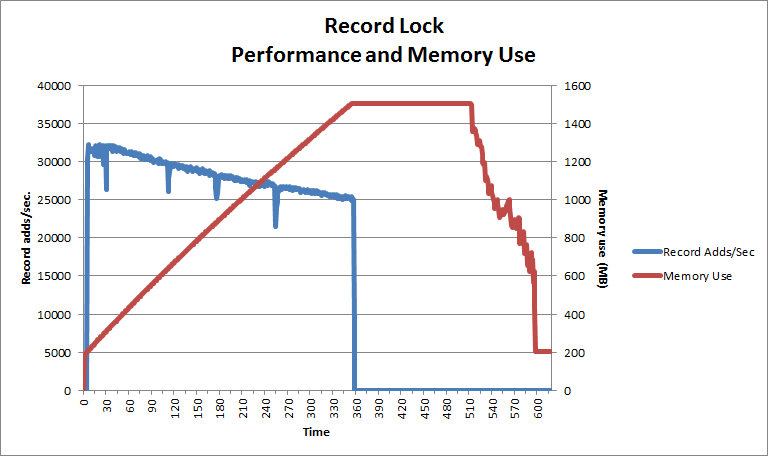
The chart below shows the results of a test of the table lock. A C# stored procedure is adding 10 million records to a c-tree data file. The data file is a non-transaction file and has no index (to help isolate the effect of record locking).
The test was run twice: first with individual record locks and then with a table lock. In the chart below, the blue line indicates performance (records added per second) and the red line indicates memory use.
The chart below shows the results for the individual record lock case: the record insert performance (blue line) decreases over time, and memory use (red line) increases over time. And when the adds are finished and the commit happens, a noticeable time is spent freeing those locks. Insert time: 356 sec.
The chart below shows the results for the table lock case: the record insert performance (blue line) is higher than with individual record locks and stays at the same level of performance throughout. The memory use (red line) initially increases by a small amount and then stays at that level. Insert time: 284 sec (20% faster).
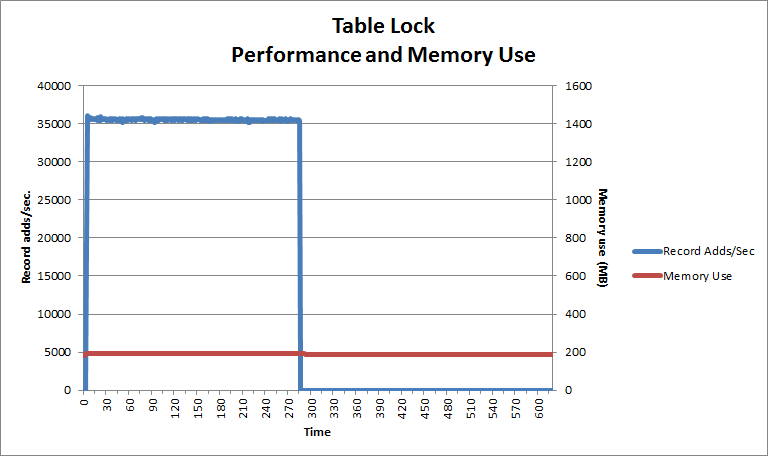
Table Locks with FairCom DB SQL
In applications where a large number of rows will be accessed for either reading or modifying, SQL provides an explicit locking construct for locking all the rows of a table. The LOCK TABLE statement explicitly locks a table in either SHARE or EXCLUSIVE mode.
The following example shows how to acquire a lock in the EXCLUSIVE mode for a table called customer from an ESQL command line:
EXEC SQL
     LOCK TABLE customer IN EXCLUSIVE MODE;
The above statement will prevent other transactions from either reading or modifying the table customer until the transaction either commits or performs a rollback.
The following example shows acquiring lock in the SHARE mode for a table called orders:
EXEC SQL
     LOCK TABLE orders IN SHARE MODE;
The above statement will prevent other transactions from modifying the orders table until the transaction either commits or performs a rollback.
Table Locks with c-tree API Functions
To acquire a file (table) lock using FairCom DB, call LOKREC() with a new ctLOCK_FILE mode as follows:
LOKREC(datno, ctLOCK_FILE, lockmode);See Table Lock Mode for LOKREC for details.
Table Lock Behavior with Transactions
If a table write lock is in effect when a record is updated in a transaction, the table write lock cannot be removed until the transaction commits or aborts. Note that the call to free the table write lock returns success (NO_ERROR) and sysiocod is set to UDLK_TRN (-3) in this situation, indicating that the table write lock was not released.
Table Lock Mode for LOKREC
To acquire a file (table) lock using FairCom DB call LOKREC() with a new ctLOCK_FILE mode as follows:
LOKREC(datno, ctLOCK_FILE, lockmode);where:
-
datnois the data file number -
lockmodeis the desired locking mode, which can be any of the following values:
ctREADREC - Acquire a file read lock. If the lock cannot be immediately acquired because a file write lock or record write locks exist on the file, then return an error.
ctREADREC_BLK - Acquire a file read lock. If the lock cannot be immediately acquired because a file write lock or record write locks exist on the file, then block until those locks are released and the lock can be acquired.
ctENABLE - Acquire a file write lock. If the lock cannot be immediately granted because file or record locks exist on the file, then return an error.
ctENABLE_BLK - Acquire a file write lock. If the lock cannot be immediately acquired because file or record locks exist on the file, then block until those locks are released and the lock can be acquired.
To free a file lock, call LOKREC() as follows:
LOKREC(datno, ctUNLOCK_FILE, 0);A file lock request can fail with the following errors:
-
FACS_ERR(26)- The specified file number (datno) is not active. -
FMOD_ERR(48)- The specified file is a type of file that does not support file locks (for example, an index file, a superfile host, or a partitioned file). -
DEAD_ERR(86)- Could not block on file lock request due to deadlock. -
TLOK_ERR(1025)- Could not obtain table lock because the table is locked, or a request to lock the table is pending, or a conflicting data record read or write lock exists.
A record lock request that fails due to a table lock may encounter:
-
DLKT_COD(1024)- Could not obtain data record lock because the table is locked, or a request to lock the table is pending (sysiocod).
A connection can only acquire one file lock on a particular file at a time.
A connection can acquire a table write lock when:
- no table write lock is held on the file
and
- no table read lock is held on the file
and
- either no read and write locks are held on the file, or only the table lock requester is holding read and/or write locks on the file.
A connection can acquire a table read lock when:
- no table write lock is held on the file
and
- no write locks are held on the file
When a table write lock request is granted, the requesters write and read locks are released. All lock waiters are made to wait for the table to be unlocked.
Record lock and unlock requests for a connection that holds a table write lock have no effect.
A connection that has acquired a table read lock can promote the table read lock to a table write lock by requesting a table write lock. The request is granted if:
- only one table read lock is held on the file
and
- no read locks are held on the file
and
- no record read or write lock or table lock requests are waiting.
Notes
- Blocked table lock requests take priority over record lock requests. If releasing a lock makes it possible for a blocked table lock to be acquired, any record lock requests that are waiting on the lock that is being released queue up waiting for the table lock to be released.
- Blocked table write lock requests take priority over blocked table read lock requests.
- When a table read lock request is granted, the requester’s read locks are released. (Note that the requester has no write locks on the table when the table read lock request is granted; otherwise, the table read lock request would have been denied.) Record read lock requests for a connection that holds a table read lock have no effect. Record write lock requests for a connection that holds a table read lock are denied.
- A table lock is not supported on a superfile host, only on its data file members. A table lock request on a superfile host fails with error
FMOD_ERR(48). - A table lock is not currently supported on a partition host or partition member file. A table lock request on these types of files fails with error
FMOD_ERR(48).
Table lock behavior with transactions
If a table write lock is in effect when a record is updated in a transaction, the table write lock cannot be removed until the transaction commits or aborts. Note that the call to free the table write lock returns success (NO_ERROR) and sysiocod is set to UDLK_TRN (-3) in this situation, indicating that the table write lock was not released.
A table lock cannot be released even if the transaction is restored to a savepoint that precedes the first update of a record in the locked table.
The ctMARK_XFREED and ctKEEP_XFREED transaction modes, used in calls to start and commit a transaction respectively, cause the commit to keep only the locks that were explicitly freed during the transaction. When these modes are used and a table lock is acquired before the transaction commits, the mode applies to the table lock: if a call is made to free the table lock before the transaction commits, the commit releases the table lock; otherwise, the commit keeps the table lock.
This feature is only available with the FairCom DB Server operational model.