
This chapter discusses important features for maintaining data integrity. The c‑tree Single User mode and FairCom Server both offer full on-line transaction processing and file mirroring. These features and more are discussed in this chapter.
Transaction Processing Concepts
FairCom DB Transactional Technology
The Transactional Technology layer includes the low-level functions to control and maintain transaction integrity, guaranteeing complete recovery of data should an unexpected outage occur, such as hardware or power failures. With the FairCom DB transaction logging facility, many advanced features can be enabled such as dynamic dumps with complete roll forward capability and complete index data backup; replication to failover sites; and transaction history for auditing.
Transaction control provides two extraordinarily powerful tools for your applications - atomicity of operations, and recovery of data. In fact, there are four key components of any complete transactional system, collectively referred to as ACID:
Atomicity - Grouping of database update operations into all-or-nothing commits;
Consistency - The database remains in a valid state due to any transaction;
Isolation - Concurrent transactions do not interfere with each other outside of well-defined behaviors;
Durability - Committed transactions are guaranteed to be recoverable, even if the data and index files are inconsistent.
FairCom DB is fully ACID compliant and as such, FairCom DB provides the highest levels of transaction integrity.
FairCom DB transaction control can also be enabled for many legacy applications allowing many additional advanced features to be available. Automatic transactions, while not providing complete atomic operations, do allow full recovery, and an ability to add replication for fault tolerant systems and dynamic dumps of index data.
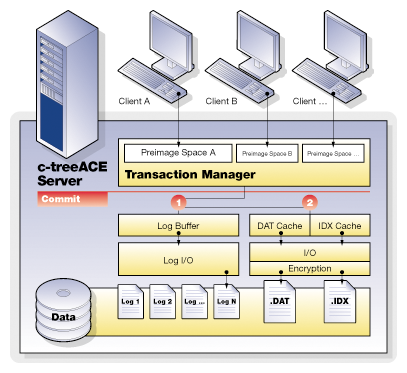
Why Do We Need Transaction Processing?
Let’s examine an example, entering an invoice into an accounting system. When we create an invoice, several data files may be updated. The customer master file may have a field for each customer that keeps the current balance. This balance must be increased if we issue an invoice. There is an invoice file that has a record added to it. There may be a separate invoice detail file, keeping a record of each line on the invoice. In addition, each invoice detail will affect the balance of an inventory item. All of these files must be in sync - the customer balance must match the total of the open invoices, the detail lines must all be present, and the inventory balances must be accurate as affected by the invoices and other activities.
What happens if the computer crashes while these files are being updated? You could have some of the files already updated, but others not. For instance, the customer and invoice files could be updated, but the inventory records may not. Depending on the way the operating environment works, those records that already exist (the customer and inventory records) could be updated, but the records that are to be added to the file (the invoice and invoice details) may not be saved yet. In any case, you now have files that are not synchronous. Adjusting the files to bring them back into balance can be difficult, as you may not be sure which files have been updated and which have not. Often your only choice is to go to a backup copy of the files, where you know that all of the files are synchronous. Unfortunately, these backups could be days out of date (or more!), and it can take time to make them current.
It doesn’t have to be a disaster situation to cause problems, either. The file updating in our example requires a number of files and records, and the user has to have the proper file and record locks in order to be able to complete the processing. What if you find that you are part way through the updating process and you cannot get one of the records to update? For instance, if you have a large number of details in the invoice, you may find that part way through the process one of the inventory records is locked by another user. Do you just skip this item? If you have done a large number of updates already, for the other details in the invoice, how do you go back?
The answer to these problems is transaction processing with FairCom DB single-user mode or the FairCom Server.
Atomicity
Atomic operations allow an all-or-nothing approach to database updates. Grouping operations together provides for both business unit cohesiveness, as well as performance. Multiple files take part within a single transaction. Should any operation within the transaction fail, this entire sequence can be immediately aborted. Compare this to maintaining individual file updates under your own control.
To enhance the all-or-nothing atomic operation, complete savepoint and rollback features allow you to quickly move within a transaction as conditions change. Errors can be handled and operations adjusted without completely starting over.
In addition, FairCom DB offers extremely fine grained locking mechanisms both within and between transactions. The ability to keep locks from before a transaction begins, and maintain locks after a transaction commits gives FairCom DB developers control unavailable in most other database technologies. This yields a key advantage to high performance and acutely tuned applications.
Journaling
FairCom's transaction management system maintains files that record various states of information necessary to recover from unexpected problems. Information concerning ongoing transactions is saved on a continual basis in these transaction log files. A chronological series of transaction logs is maintained during the operation of the application. Transaction logs containing the actual transaction information are saved as standard files. They are given names in sequential order, starting with L0000001.FCS (which can be thought of as active transaction log, number 0000001) and counting up sequentially (that is, the next log file is L0000002.FCS, etc.).
By default, the transaction management logic saves up to four active logs at a given time. When there are already four active log files and another is created, the lowest numbered active log is either deleted or saved as an inactive transaction log file, depending on how FairCom DB is configured.
Every new FairCom Server session begins with checking the most recent transaction logs (the most recent 4 logs, which are always saved as “active” transaction logs) to determine if any transactions need to be undone or redone. If so, these logs are used to perform automatic recovery.
The FairCom DB transaction logs serve as the ultimate control point for many important FairCom DB features:
- Automatic Recovery on startup
- Dynamic Backups
- Roll forward/backward capabilities
- Replication
- Change History
Automatic Recovery
Once you establish full transaction processing using the ctTRNLOG file mode, you can take advantage of the automatic recovery feature. Atomicity will generally prevent problems of files being partially updated. However, there are still situations where a system crash can cause data to be lost. Once you have signaled the end of a transaction, there still is a “window of vulnerability” while the application is actually committing the transaction updates to disk. In addition, for speed considerations some systems may buffer the data files and indexes, so that updates may not be flushed to disk immediately. If the system crashes, and one of these problems exist, the recovery logic detects it. If you set up the system for automatic file recovery, the recovery logic automatically resets the database back to the last, most complete, state that it can. If any transaction sets have not been completed, or “committed”, they will not effect on the database.
FairCom offers the most complete set of transaction processing functions and capabilities of any file management product on the market today. By using these functions properly, we can provide both atomicity and automatic recovery.
Transaction Grouping
The FairCom Server supports grouping transaction commit operations for multiple clients into a single write to the transaction logs. Transaction grouping, or commit delay, is a high performance optimization for environments with large numbers of clients sustaining high transaction rates. Commit delay takes advantage of the overhead involved in flushing a transaction log. The performance improvement per individual thread may result in only milliseconds or even microseconds, however, multiplied hundreds of times over hundreds of threads and thousands of transactions per second, this becomes quite significant.
Effect of commit delay on transaction commit times for multiple threads:
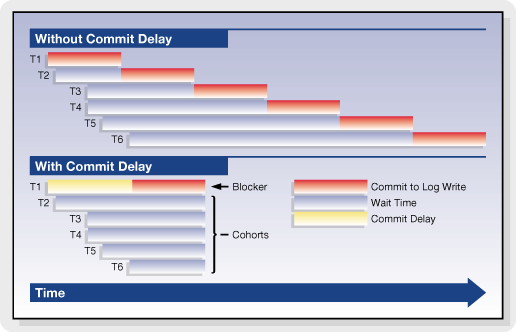
FairCom has supported commit delay logic for many years and continues to optimize and enhance the effectiveness of the transaction grouping logic. For example, in recent FairCom DB editions, the commit delay is self-adjusting and numerous heuristics and statistics have been added to constantly monitor and report the effectiveness of the current commit delay state.
Basic Transaction Processing
Many of the benefits of transaction processing can be achieved very easily. This section will introduce you to the basics of establishing transaction processing. For many users, this will be all that is needed. Detailed explanations of the functions used here will be given later, including additional functions and other options.
Transaction File Modes
When you are creating your data files and indexes, you have three options in relation to transaction processing. These options are established by using the appropriate value in the file mode for the file that you are creating.
ctTRNLOG
If you use a file mode of ctTRNLOG, you will get the full benefit of transaction processing, including both atomicity and automatic recovery. If you are not sure of what mode to use, and you do want to use transaction processing, then use this mode.
ctPREIMG
The ctPREIMG file mode implements transaction processing for a file but does not support automatic file recovery. Files with ctPREIMG mode do not take any space in the system transaction logs.
ctLOGIDX
Transaction controlled indexes with this file mode are recovered more quickly than with the standard transaction processing file mode ctTRNLOG. This feature can significantly reduced recovery times for large indexes and should have minimal effect on the speed of index operations.
ctLOGIDX is only meaningful if the file mode also includes ctTRNLOG. Note that ctLOGIDX is intended for index files only! Do not use ctLOGIDX with data files.
No Transaction Processing
If you do not use either ctPREIMG or ctTRNLOG then the file will not be involved in transaction processing in any way. If you are using transaction processing then you should only do this with files that do not need to be kept as a part of your database. If you are NOT using transaction processing, consider reviewing the ctWRITETHRU file mode in Data and Index Files.
Please note that you should only use one or the other of ctPREIMG and ctTRNLOG.
Create Files
When you create a data file and index, you must specify if that file is to be involved with transaction processing. To get the full benefits, including atomicity and automatic recovery, every file that requires recoverability should have the file mode of ctTRNLOG. Just OR it in with the other file mode values.
Even a library that does not support transaction processing (e.g., standalone multi-user or single-user NO_TRANPROC) can create files that will be transaction ready when opened in a TRANPROC environment. The files automatically revert to NO_TRANPROC when returned to a NO_TRANPROC environment (in which case Begin, Commit, Abort behave as LockISAM calls). To create such a file in a NO_TRANPROC environment simply set the file mode to include either ctTRNLOG or ctPREIMG at create time.
There are two strategies to create a file in a TRANPROC environment that can be used in a NO_TRANPROC environment:
- Set the file mode to include either
ctTRNLOGorctPREIMG. After creating the file, but before closing it (which ensures the file is still opened exclusively), callUpdateHeader(filno, TRANMODE, ctXFL_ONhdr)orUpdateHeader(filno, PIMGMODE, ctXFL_ONhdr), respectively. Please be aware that you need to callUpdateHeader()for each physical file just created: data and indexes. - Set the file mode to include either
ctTRNLOGorctPREIMGand includingTRANMODE(ifctTRNLOG) orPIMGMODE(ifctPREIMG) in thex8modemember of the extended create block.
An index file that does not include either ctTRNLOG or ctPREIMG in its filemode CANNOT be changed via a call to UpdateHeader(). It must be rebuilt instead.
A call to UpdateFileMode() that changes between ctTRNLOG and ctPREIMG, or ctPREIMG and ctTRNLOG, will have the TRANMODE and PIMGMODE information updated automatically. However, a call to UpdateHeader() to set or turn on TRANMODE or PIMGMODE that is incompatible with the existing file mode or auto switch mode results in a TTYP_ERR (99).
For example, if TRANMODE is already turned on, then PIMGMODE cannot also be turned on. If the file mode is ctPREIMG, TRANMODE cannot be turned on. It is possible to turn off TRANMODE or PIMGMODE by using UpdateHeader() with ctXFLOFFhdr.
A superfile member cannot set TRANMODE or PIMGMODE unless the host has the same settings. UpdateHeader() returns SRCV_ERR (419) if the settings don’t match.
Files can also be created as “Transaction Dependent”, allowing the create to be aborted. See Transaction Dependent Creates and Deletes.
Begin Transactions - Begin()
You will need to decide on logical groups of file updates that can be delimited as transactions. Record locks are held on updated records for the duration of the transaction, so you don’t want to make the transaction group too large. On the other hand, you do not want to make the transaction group too small. You must contain all of the related updates in one transaction. Using our example from above, you don’t want to have the transaction group involve more than one invoice. You also don’t want it to involve less than a whole invoice.
To begin a transaction make the following call to the Begin() function:
Begin(ctTRNLOG | ctENABLE);The ctENABLE parameter eliminates the need for a call to LockISAM(). A LockCtData() call attempting to unlock a record that is part of transaction returns NO_ERROR (0), but sets sysiocod to UDLK-TRN (-3), indicating the lock will be held until the end of the transaction.
Begin
You use the Begin() function to mark the beginning of the transaction. This function will return a transaction number that you may want to use in some situations. You will pass a mode to Begin, which can be either ctTRNLOG or ctPREIMG.
The file modes of all files updated during a transaction must be compatible with the mode used in the Begin() call.
- If the
Begin()mode isctPREIMG, all files updated during the transaction must have been created with a file mode ofctPREIMG, or no transaction processing at all. If an updated file was created with a file mode ofctTRNLOGthen the update will return theTTYP_ERR(99) error code. You cannot skip transaction logging if the files have been set up for transaction logging. - If the
Begin()mode isctTRNLOG, transaction logging for a file will not take place if the file was created with a file mode ofctPREIMGor no transaction mode at all.
If you created a file with a file mode of ctTRNLOG, then you must use ctTRNLOG with your call to Begin() (if the file is to be updated during the transactions).
There are other values that you can OR in with the transaction mode.:
-
ctENABLE: Automatically invokesLockISAM( ctENABLE )for all records in the transaction. -
ctREADREC: Automatically invokesLockISAM( ctREADREC )for all records in the transaction. -
ctLK_BLOCK: Used in addition toctENABLEorctREADRECconverts them toctENABLE_BLKorctREADREC_BLK, respectively.
ctSAVENV: With this mode, each Begin() and SetSavePoint() saves the current ISAM record information so a subsequent Abort() or RestoreSavePoint() automatically restores the current ISAM record information.
End Transaction - Commit()
When you have finished all of your updates for this transaction, you must end it to “commit” the transaction. Until you have done this, none of the actual transaction updates will occur. The Commit() function is used to do this. In addition to committing the transaction, Commit() can free all locks created during the transaction.
Commit(ctFREE);That is all you have to do to get complete transaction processing protection in your application using FairCom DB. There are, however, other variations on how you can use these functions, as well as additional functions.
Note If an file update error has occurred during the transaction, and that error has not been resolved properly, FairCom DB will not allow you to successfully commit the transaction. This preserves the integrity of your data.
End
The function Commit() will end the transaction, and commit it. This means that all of the updates that have taken place since the last Begin() call will actually take place. Commit() requires a parameter, either ctFREE or KEEP. ctFREE frees all ISAM locks held for the transaction. KEEP keeps all the locks, though they can be released later with LockISAM( ctFREE ).
Note If a file update error has occurred during the transaction, and that error has not been resolved properly, FairCom DB will not allow you to successfully commit the transaction. This preserves the integrity of your data.
Record Locking
Record locking requirements are the same with and without transaction processing. Records to be updated or deleted should be locked. Use of ctCHECKLOCK as a file mode will ensure that no updates are performed without locks.
Begin
When you invoke Begin() you can OR the constants ctENABLE or ctREADREC into the transaction mode. If you want the locks to block when they are not available, also OR ctLK_BLOCK into the transaction mode. This automatically invokes LockISAM(), so all ISAM update functions automatically lock records. During the transaction, you can modify the ISAM lock mode by further calls to LockISAM().
Low-level functions still require explicit record locks with LockCtData().
Commit
At the end of the transaction you have different options in the Commit() call:
- You can use a mode of
ctFREEto free all locks, both ISAM and low-level locks, automatically (all locks initiated before or during the transaction). - You can use a mode of
ctKEEPto hold onto all current record locks. - Use
ctKEEP_OUTto release only locks obtained during the transaction or on records altered during the transaction, keeping most or all locks obtained before the transaction. - Use
ctKEEP_OUT_ALLto keep all locks obtained before the transaction.
To free any kept locks you must make a LockISAM( ctFREE ) call, or a LockCtData( ctFREE ) call for each low-level record lock.
Aborting a Transaction
There may be situations where you do not want to commit the transaction. Rather, you will want to throw the whole thing out as if it never took place. For instance, you are taking a customer order over the telephone, updating the files as the customer requests certain items. However, the customer decides that the order should not be placed at all, and cancels out. Without transaction processing, you would be faced with the difficult process of going back and reversing out all of the updates that you have done. Alternately, you could build your system so that you don’t actually do the updates, you just keep them in a temporary file. This can also be a problem, as you are not able to place a commitment on a particular inventory item, and when you actually decide to place the order you may find that the items you promised were consumed by another order.
Abort and AbortXtd
This process is made simple by transaction processing. Start the order with a Begin() call, process the order details as you go, and issue a Commit() call to commit the updates when the customer decides to place the order. However, if the customer decides to back out, you can use the Abort() call to abort the transaction. This will abort all of the file updates since the last call to Begin(), as well as releasing all locks. Abort() can be used whether Begin() uses the ctPREIMG or ctTRNLOG mode.
Note Starting a transaction in an interactive mode will cause long held locks on those items updated, but not yet committed.
Changes in V11.5
Note This is a Compatibility Change.
When aborting a transaction on the master server failed, we previously returned immediately rather than aborting the transaction on the local server. Now, in this situation, we mark the master server transaction as no longer active and then we abort the local transaction.
When phase 1 of the master server commit fails, we did not reset the active transaction indicator for the master server. This caused us to believe that the transaction on the master server was still active, even though it was not. Now we properly reset the active transaction indicator in this situation.
Savepoints
There are times you want to abort a portion, but not all, of a transaction. You may be processing several optional paths of a program, going down one branch, then backing out and trying another branch. It may be possible that you don’t want any of the updates to occur until you are completely finished, but you want the flexibility to back out a part of the updates. Another possibility would be if you have run into some form of update error, such as an AddRecord() failing due to a duplicate key. You would want to back up to a prior point, correct the problem, and continue. The FairCom Server lets you implement this by using savepoints.
SetSavePoint
A savepoint is a temporary spot in the transaction that you may want to back up to without having to abort the entire transaction. During a transaction, when you want to put a place mark in the process, issue a SetSavePoint() call. This does not commit any of the updates. The function returns a savepoint number, which you should keep track of. You can make as many SetSavePoint() calls as you wish during a transaction, and each time you will be given a unique savepoint number.
RestoreSavePoint
When you decide that you want to back up to a savepoint, issue a RestoreSavePoint() call. You will pass this function the savepoint number that you want to back up to. This returns you to the point at which you issued the specified SetSavePoint() call, without aborting the entire transaction.
Record locks that are held on actions after that savepoint will be released, unless they were also locked by actions prior to the savepoint.
ClearSavePoint
ClearSavePoint() removes a savepoint WITHOUT UNDOING the changes made since the savepoint. Calling ClearSavePoint() puts pre-image space in the same state as if the most recently called savepoint had never been called. By comparison, RestoreSavePoint() cancels changes made since the last savepoint, but does NOT remove this savepoint.
ReplaceSavePoint
ReplaceSavePoint() establishes a savepoint while at the same time clearing the previous savepoint providing a "moving" savepoint within a transaction. Only the most recently established savepoint can be restored to. To restore to this savepoint, call RestoreSavePoint(-1).
Errors in Transactions
The primary purpose of Transaction Processing is to protect the integrity of your data. This is particularly important if you are updating multiple files in one transaction. Earlier in this chapter, we used the example of an invoicing system, where we are updating a customer file, an invoice master and detail file, and an inventory file. We want either the entire invoice process to complete, or none of it. A partially entered invoice is not acceptable.
If an update error occurs, an error flag is set. If you try to use Commit() to commit this transaction, an error code will be returned and the transaction will be aborted.
If an update error occurs we typically have two choices: abandon the entire transaction, or go back to a savepoint and try again. The choice is yours, and the correct choice may depend on what error occurred and how you can correct it.
Abort
To abandon the entire transaction you will use the Abort() function. This will throw away all update actions that occurred since the initial Begin() call. You can start another transaction, or take some corrective action.
RestoreSavePoint
If you have been setting savepoints with the SetSavePoint() function, you can back up to an appropriate place in your transaction with the RestoreSavePoint() function. This allows you to go back part way into the transaction and then continue on, without throwing everything away.
File Operations During Transactions
Creating and opening files is not permitted during a transaction unless the file is created with the Extended File Mode including ctTRANDEP, which may only be created during a transaction. Therefore, all files, without the ctTRANDEP file mode, to be accessed within a transaction must be opened prior to the Begin() call.
Closing Files During Transaction Processing
When closing or deleting a file during a transaction, the current default behavior fails the attempted close or delete with CPND_ERR (588).
To return to the previous default behavior, (automatically abort the transaction and close/delete the file), add #define ctBEHAV_AbortOnCLOSE to ctoptn.h. For the c‑tree Server, add the following to the FairCom Server configuration file:
COMPATIBILITY ABORT_ON_CLOSE
Optional Defer of Close Until Transaction Commit/Abort
FairCom DB supports the ability to defer file closes and deletes during transactions until the transaction is completed or aborted. This allows more flexible file handling without worrying about whether a transaction-controlled file was currently involved within a transaction. SetOperationState() can change the behavior of a file close request when the file has been updated as part of a still active transaction. Turning on OPS_DEFER_CLOSE causes defers a file close or delete until the transaction is committed or aborted.
Updates by other clients do not affect the “update status” of a file for a client who has not updated the file within a transaction.
For example:
OPEN FILE A                                       client #1
OPEN FILE A                                       client #2
OPEN FILE B                                       client #2
SETOPS (OPS_DEFER_CLOSE, OPS_STATE_ON);           client #1
SETOPS (OPS_DEFER_CLOSE, OPS_STATE_ON);           client #2
TRANBEG                                           client #1
TRANBEG                                           client #2
READ FILE A                                       client #1
UPDATE FILE A                                     client #2
CLOSE FILE A (succeeds without defer)             client #1
CLOSE FIL  A (deferred)                           client #2
UPDATE FILE B (suceeds without defer)             client #2
TRANEND (causes a CLOSE ON FILE A)                client #2
CLOSE FILE B                                      client #2
TRANEND                                           client #1
This example shows that client #2’s update does not cause a defer when client #1 closes file A within a transaction in which client #1 had not updated file A, but client #2’s close is deferred.
- A request to reopen the file with the same file number within the same transaction will be honored.
- An attempt to reopen the file with a different file number within the same transaction will be honored, provided there is no overlap with the original file numbers due to index members.
- An attempt to open a different file with the same file number or overlapping file numbers will fail.
For example:
OPEN A as file #2   (where A has two additional index members)
OPEN B as file #10
SETOPS(OPS_DEFER_CLOSE,OPS_STATE_ON)
TRANBEG
UPDATE A
CLOSE A             (deferred: file #s 2,3 and 4 still in use by A)
UPDATE B
OPEN A as file #2   (succeeds since same file reusing file numbers)
UPDATE A
CLOSE A             (deferred: file #s 2,3 and 4 still in use by A)
UPDATE B
OPEN C as file #2   (fails because of defer on file A)
OPEN A as file #0   (fails because of overlap with itself)
OPEN A as file #9   (fails because of overlap with B)
OPEN A as file #5   (succeeds)
OPEN C as file #2   (succeeds because file A now reassigned)
There are restrictions on file mode changes between a deferred close and a subsequent reopen within the same transaction. A file originally opened in exclusive mode can be reopened in ctSHARED mode. A file originally opened in ctSHARED mode must be reopened in ctSHARED mode. ctREADFIL is not allowed on a reopen.
Notes
-
ctEXCLUSIVE reopen of a deferred close of a ctSHARED file - If a file opened
ctSHAREDhas its close deferred, and an attempt is made to “reopen” the file inctEXCLUSIVEmode, the reopen will now succeed under the Server if no one else has the file opened. For example, the second open below succeeds only if no other user has the file open.
   datno = OpenFileWithResource(,ctSHARED);
   Begin;
   DO_Stuff();
   CloseIFile(datno);
   datno = OpenFileWithResource(,ctEXCLUSIVE);
   Commit();
Here are the expected results for deferred close and subsequent open requests:
| Current status | Same user | Another user |
|---|---|---|
Deferred close after ctEXCLUSIVE open |
May reopen the file in ctEXCLUSIVE or ctSHARED mode |
Cannot open file |
Deferred close after ctSHARED open |
May reopen the file in ctSHARED mode. May reopen the file in ctEXCLUSIVE mode if no other user has the file open. |
May open the file in ctSHARED mode |
-
File number change after deferred close - In single-user
TRANPROC, a deferred close followed by a reopen with a different file number returnsCHGF_ERR(645). To avoid this error, always re-open using the same file number. For ISAM files, this is easily accomplished usingOpenFileWithResource()with a-1forfilnoor usingOpenIFile()with an IFIL structure settingdfilnoto-1.
Defer File Delete
If OPS_DEFER_CLOSE is on, a file delete on a file updated by a still active transaction will be deferred until the commit or abort of the transaction. An attempt to reopen the file within the same transaction results in a FNOP_ERR (12) as if the file were actually gone. An attempt to re-create the file within the same transaction will not succeed because the file has not yet been deleted.
Transaction Dependent Creates and Deletes
A major transaction-processing feature, known as Transaction Dependent Creates/Deletes, supports the creation and deletion of Extended files under transaction control. For Standard files, the physical creation and deletion of files from disk is handled outside the scope of transaction control. In other words, Standard files do not support such operations as “aborting a create” or “rolling back a delete.”
If you are using ISAM to create the files with transaction control, Transaction Dependent Creates/Deletes are a best practice. (If you are using SQL to create the files with transaction control, this mode is automatically used.) The main benefit of this mode is helping automatic recovery to know which files should exist. When files are created without this mode, you may need to use SKIP_MISSING_FILES YES during recovery, which is discouraged except when specific error messages indicate it is necessary.
File creates and deletes may be part of a transaction and are subject to being undone in case of crashes, savepoint restores, and aborts. This is accomplished with the extended file mode ctTRANDEP. An Extended file with ctTRANDEP in its extended file mode is assumed to utilize transaction-dependent creates and deletes and must be created within a transaction. There is no special function call for transaction dependent creates or deletes.
If a different client attempts to open or create a file pending delete, DPND_ERR (643) is returned to signify that opens/creates must await the commit or abort of the delete.
To utilize a transaction-dependent delete with a file not created with ctTRANDEP, it will be necessary to update the file header to include the ctTRANDEP bit in the x8mode member of the extended header.
To support the rollback of a transaction-dependent file delete, which requires FairCom DB to maintain a copy of the old file after the delete is committed, use the ctRSTRDEL extended file mode. ctRSTRDEL automatically implies ctTRANDEP, but the reverse is not true. When only ctTRANDEP is used, the overhead of storing copies of an old file after its delete is committed is avoided.
A transaction-dependent create is only supported by the Xtd8 create routines, and requires an extended file mode with ctTRANDEP and/or ctRSTRDEL included. To perform a transaction-dependent create of a Standard FairCom DB file, call one of the create routines with ctNO_XHDRS and either ctTRANDEP or ctRSTRDEL included in the extended file mode. Including ctNO_XHDRS in the extended file mode causes the create routines to create a Standard file. If ctNO_XHDRS conflicts with other extended file mode bits, then the create will fail with XCRE_ERR (669).
To convert an existing Standard file to support transaction-dependent deletes, use calls of the form:
UpdateHeader(filno,ctTRANDEP,ctXFL_ONhdr);or
UpdateHeader(filno,ctRSTRDEL,ctXFL_ONhdr);However, these UpdateHeader() calls cannot convert a Standard file to an Extended file.
- Dynamic Dumps - A file with
ctTRANDEPin its extended file mode that is deleted after the effective dump time will be sure to exist at the time this particular file is dumped. This accomplished by making the delete wait until the file is dumped. -
PermIIndex8()andTempIIndexXtd8()supportctTRANDEPcreates. WithoutctTRANDEPcreates, these routines cannot be called within a transaction. WithctTRANDEPcreates, they MUST be called within a transaction. -
DropIndex()marks a transaction-controlled index for deletion by settingkeylento -keylen until the drop is committed. AGetIFile()call after theDropIndex()call, but before theCommit()orAbort()will return this interim setting.
Note As of version 13.0.3, only the creator of a transaction-dependent file can open it in shared mode before the associated transaction commits. Once the transaction commits, the file automatically transitions to shared mode for all users.
In versions before 13.0.3, shared mode was not usable before the transaction was committed.
Transaction Processing Logs
The FairCom transaction management logic creates special system files to record various kinds of information necessary to recover from problems. The majority of this section applies to both the FairCom Server and single-user (stand-alone) transaction processing enabled applications; therefore, the generic term application refers to both the FairCom Server and a single-user application.
The following list details the files created:
Note To be compatible with all operating systems, the names for all these files are upper case characters. For a complete backup, be sure these files are saved when appropriate (i.e., backed up) and used for recovery if necessary. However, except for FAIRCOMS.FCS, do NOT include these files in your dynamic dump script.
- System Status Log - When the application starts up, and while it is running, the transaction management logic keeps track of critical information concerning the status of the application (e.g., when it started, whether any error conditions have been detected, and whether it shuts down properly). This information is saved in chronological order in a system status log, named CTSTATUS.FCS.
- Administrative Information Tables - FairCom Server ONLY. The FairCom Server creates and uses FAIRCOM.FCS to record administrative information concerning users and user groups.
-
Transaction Management Files - The transaction management logic creates the following four files for managing transaction processing:
- I0000000.FCS
- D0000000.FCS
- S0000000.FCS
- S0000001.FCS
- It is important to safeguard these files, especially the two whose names begin with ‘S’.
-
Active Transaction Logs - Information concerning ongoing transactions is saved on a continual basis, in a transaction log file. A chronological series of transaction logs is maintained during the operation of the application. Transaction logs containing the actual transaction information are saved as standard files. They are given names in sequential order, starting with L0000001.FCS (which can be thought of as active transaction log, number 0000001) and counting up sequentially (i.e., the next log file is L0000002.FCS, etc.).
- By default, the transaction management logic saves up to four active logs at a given time. When there are already four active log files and another is created, the lowest numbered active log is either deleted or saved as an inactive transaction log file, depending on how the FairCom Server is configured (see the term “Inactive transaction logs” below).
- Every new session begins with the application checking the most recent transaction logs (i.e., the most recent 4 logs, which are always saved as “active” transaction logs) to see if any transactions need to be undone or redone. If so, these logs are used to perform automatic recovery.
-
Inactive transaction logs - Transaction logs that are no longer active (i.e., they are not among the four most recent log files) are either deleted or saved as inactive transaction log files when new active log files are created. The choice of deleting old log files or saving them as inactive log files is made when configuring the Server (see the
KEEP_LOGSconfiguration option). The number of active single user transaction logs is discussed in Single-User Transaction Processing.
An inactive log file is created from an active log file by renaming the old file, keeping the log number (e.g., L0000001) and changing the file’s extension from .FCS to .FCA. The application Administrator may then safely move, delete, or copy the inactive, archived transaction log file.
When an apparently old log file is encountered while transaction processing attempts to create the next log file (e.g., log 5 is about to be created, but a log 5 already exists), FairCom DB attempts to first rename the old log (from .FCA to .FCQ) and then attempts to create the new log. If this succeeds, then the system continues without interruption (although an entry is made in CTSTATUS.FCS and on server systems a notice of this event is routed to the console). If the renaming does not cure the problem then a NLOG_ERR (498) will be returned and the system will terminate due to a failed transaction write.
Note The *.FCA files should be saved for use in cases when the .FCS files are needed for a backup. In the event of a system failure, be sure to save all the system files (i.e., the files ending with .FCS). CTSTATUS.FCS may contain important textual information concerning the failure.
When there is a system failure due to power outage, there are two basic possibilities for recovery:
- When the power goes back on, the system will use the existing information to recover automatically, or
- The Administrator will need to use information saved in previous backups to recover (to the point of the backup) and restart operations.
Automatic Log Adjustments
In extreme circumstances, the size of the logs will expand or the number of active logs will increase. A very large transaction, perhaps with a large variable-length record, may require a single log file to expand to hold the entire transaction. A transaction that takes a long time to commit or abort may require the number of active logs to increase. Both of these conditions are temporary, and are automatically handled by the FairCom Server.
Automatic Log Size Adjustment
Long variable-length data records can cause transaction logs to roll over so fast that checkpoints are not properly issued. By default, the FairCom Server automatically adjusts the size of the log files to accommodate long records. As a rule of thumb, if the record length exceeds about one sixth of the individual log size, the size will be proportionately increased. When this occurs, CTSTATUS.FCS receives a message with the approximate new aggregate disk space devoted to the log files.
To disable this adjustment, add FIXED_LOG_SIZE YES to the FairCom Server configuration file. A single-user TRANPROC application can disable the adjustment by setting the global variable ctfixlog to a non-zero value.
Note When disabled, a record which would have caused an adjustment results in error
TLNG_ERR(654) when it is written to a file supporting full transaction processing. It does not apply to pre-image files unless they are part of a dynamic dump withPREIMAGE_DUMPturned on.
ctLOGRECLMT defaults to 96MB in ctclb3.c. If a record exceeds this length and log adjustment is not permitted, the log is not adjusted. An entry is made in CTSTATUS.FCS indicating the approximate record length in megabytes.
Automatic Increase of Active Transaction Logs
If a committed transaction gets its Commit() written to disk before being flagged for abandonment, it is still possible the transaction will not complete before the log containing the Begin() is made inactive. After writing the Commit(), the pre-image space still must be merged with the real files before the Commit() can return. If this is about to happen, the number of active log files is increased unless the FIXED_LOG_SIZE has been activated, in which case the system must terminate.
SystemConfiguration Log Space Reporting
SystemConfiguration() can return the current approximate space in MB for the log files. With the automatic adjustments to the log size and the number of active log files, log space can increase as the FairCom Server operates. cfgLOG_SPACE is the index into the array of LONGs filled in by SystemConfiguration().
SystemConfiguration Log Reporting Enhancements
SystemConfiguration() can return the data record length limit that triggers an increase in the size of the log files. Transaction controlled records longer than this limit increase the size of the log files or cause a TLNG_ERR (654) if the log space is fixed. cfgLOG_RECORD_LIMIT is the index into the array of LONGs filled in by SystemConfiguration(). The initial record length limit is approximately one fortieth, 1/40, of the total log space. The limit is reset each time the log size is adjusted.
Flush Directory Metadata to Disk for Transaction-Dependent File Creates, Deletes and Renames
When a file is created, renamed, or deleted, the new name of the file is reflected in the file system entry on disk only when the containing directory's metadata is flushed to disk. If the system crashes before the metadata is flushed to disk, the data for the file might exist on disk, but there is no guarantee that the file system contains an entry for the newly created, renamed, or deleted file. In a test case we noticed that after a system power loss a transaction log containing valid log entries still had the name of the transaction log template file.
In release V11 and later, c-tree ensures that creates, renames, and deletes of transaction log files and transaction-dependent files are followed by flushing of the containing directory's metadata to disk. This change also applies to other important files such as CTSTATUS.FCS, the master key password verification file, and files created during file compact operations (even if not transaction dependent).
To revert to the old behavior, add COMPATIBILITY NO_FLUSH_DIR to ctsrvr.cfg.
Automatic Recovery
Once you establish transaction processing you can take advantage of automatic recovery. Transaction logging places enough information in the transaction log files to ensure transactions can be undone or redone during automatic recovery.
If the application crashes for some reason (anything from a software problem to power failure of the hardware) while instructions are being processed, the application will detect that a problem has occurred the next time it starts up. The transaction management logic will then automatically reset the database back to the last, most complete state that it can, using the transaction log. Transactions committed before the crash will be redone, while those not yet committed will be undone.
Only those files that were created with a transaction mode of ctTRNLOG will be affected.
Automatic recovery also comes into play if the file system is heavily buffered (which dramatically improves performance). With buffering, updates that have been committed may still be sitting in a file buffer somewhere, not yet written to disk. This can be offset by using the file mode of ctWRITETHRU, but that may slow the system down noticeably. Don’t use ctWRITETHRU with ctTRNLOG files. ctWRITETHRU is not necessary because the database server can detect if these buffered transactions have not yet been written to the disk, and will use the transaction log to complete them.
When keeping memory use to a minimum is important, and when automatic recovery requires more FairCom DB file control blocks, set separate limits on the number of files used during automatic FairCom Server recovery and regular FairCom Server operation. Auto recovery may require more files than regular operation because during recovery, files once opened stay open until the end of recovery, which may not be the case with regular operation.
For the FairCom Server, the configuration keyword RECOVER_FILES takes as its argument the number of files to be used during recovery. If this is less than the number to be used during regular operation, (specified by the FILES keyword), the recovery files is set equal to the regular files, and the keyword has no affect. If the recovery files is greater than the regular files, at the end of automatic recovery the number of files is adjusted downward. This frees the memory used by the additional control blocks, ~900 bytes per each logical data file and index.
For non-server implementations, set the variable ctrcvfil to the number of files to use during recovery. In a ctNOGLOBALS implementation, ctrcvfil can only be accessed prior to initializing FairCom DB if the global structure has already been allocated by registering FairCom DB.
If automatic recovery fails on a FairCom Server because a file is missing or does not match the unique file ID, CTSTATUS.FCS receives a message stating SKIP_MISSING_FILES YES has been added to the FairCom Server configuration file. The automatic recovery continues in this case.
For a single-user TRANPROC application, a message about setting ctskpfil to one, (enabled), is placed in CTSTATUS.FCS. When missing files are skipped, the listing of the skipped files indicates the type of log entry that triggered the skipped files message:
-
RCVchk- checkpoint log entry -
RCVopn- a file open log entry -
RCVren- a file rename log entry
The RCVchk or RCVopn could potentially indicate a serious problem, unless of course the file reported has been intentionally deleted or moved. The RCVren value most likely indicates the old or original file has not been located. Of course, if the listed file is the new file this could present a serious problem.
Transaction High-Water Marks
The FairCom transaction processing logic, used by the FairCom Server and in single-user transaction processing, uses a system of transaction number high-water-marks to maintain consistency between transaction controlled index files and the transaction log files. When log files are erased, the high-water-marks maintained in the index headers permit the new log files to begin with transaction numbers which are consistent with the index files.
For more information regarding transaction high-water marks, please refer to Transaction High-Water Marks.
Transaction Processing On/Off
Transaction processing control can be dynamically enabled and disabled for data and index files. UpdateFileMode() can modify the transaction processing characteristics of a file. By putting ctTRNLOG in the file mode argument of UpdateFileMode(), transaction processing is enabled. By omitting ctTRNLOG in the call to UpdateFileMode(), transaction processing is disabled. However, an index file must be initially created with ctTRNLOG in the file mode to switch back and forth. If an index file is not originally created with ctTRNLOG, it must be rebuilt from scratch to enable ctTRNLOG. One reason to disable ctTRNLOG support might be to run a large batch processing program, after which ctTRNLOG support is re-enabled. The file must be opened exclusively for UpdateFileMode(). The following code is an example of removing ctTRNLOG from the file filno.
if (UpdateFileMode(filno,ctPERMANENT|ctEXCLUSIVE|ctFIXED))
       printf("\nFile Mode Error %d",uerr_cod);
Note This is a low-level function that must be called for each physical file in an ISAM set. It will only update one file at a time.
Two-Phase Transactions
Two-Phase transaction support allows, for example, a transaction to span multiple servers. This is useful for updating information from a master database to remote databases in an all-or-nothing approach.
To start a transaction that supports a two-phase commit, you would include the ctTWOFASE attribute in the transaction mode passed to the Begin() function. Call the TRANRDY() function to execute the first commit phase, and finally Commit() to execute the second commit phase.
Note You may need additional caution with regard to locking and unlocking of records as your transactions become more complex in a multi-server environment to avoid performance problems.
Example
(Note that this example could also use individual threads of operation for the different c-tree Server connections, avoiding the c-tree instance calls.)
COUNT	rc1,rc2,filno1,filno2,rcc1,rcc2;
TEXT	databuf1[128],databuf2[128];

/* Create the connections and c-tree instances */
...
if (!RegisterCtree("server_1")) {
	SwitchCtree("server_1");
	InitISAMXtd(10, 10, 64, 10, 0, "ADMIN", "ADMIN", "FAIRCOMS1");
	filno1 = OPNRFIL(0, "mydata.dat", ctSHARED);
	FirstRecord(filno1, databuf1);
	memcpy (databuf1, "new data", 8);

	/* Prepare transaction on c-tree server 1 */
	Begin(ctTRNLOG | ctTWOFASE | ctENABLE);
	ReWriteRecord(filno1, databuf2);
	rc1 = TRANRDY();
}

if (!RegisterCtree("server_2")) {
	SwitchCtree("server_2");
	InitISAMXtd(10, 10, 64, 10, 0, "ADMIN", "ADMIN", "FAIRCOMS2");
	filno2 = OPNRFIL(0, "mydata.dat", ctSHARED);
	FirstRecord(filno2, databuf2);
	memcpy (databuf2, "new data", 8);

	/* Prepare transaction on c-tree server 2 */
	Begin(ctTRNLOG | ctTWOFASE | ctENABLE);
	ReWriteRecord(filno2, databuf2);
	rc2 = TRANRDY();
}

/* Commit the transactions */

if (!rc1 && !rc2) {
	SwitchCtree("server_1");
	rcc1 = Commit(ctFREE);

	SwitchCtree("server_2");
	rcc2 = Commit(ctFREE);

	if (!rcc1 && !rcc2) {
		printf("Transaction successfully committed across both servers.\n");
	} else {
		printf("One or more units of the second commit phase of the transaction failed: rcc1=%d rcc2=%d\n", rcc1, rcc2);
	}
} else {
	printf("One or more of the transactions failed to be prepared: rc1=%d rc2=%d\n", rc1, rc2);

	printf("Pending transactions will be aborted.\n");
	SwitchCtree("server_1");
	Abort();
	SwitchCtree("server_2");
	Abort();
}

/* Done */
SwitchCtree("server_1");
CloseISAM();
SwitchCtree("server_2");
CloseISAM();
Note Two-Phase transactions can become extremely difficult to debug should there be communications problems between servers at any time during the second commit phase. This can result in out of sync data between the servers as one server may have committed while another server failed. It is always appropriate to check the return codes of the individual Commit() functions to ensure a complete successful transaction commit across multiple servers.
User Defined Transaction Log Entries
The FairCom DB transaction logs contain information detailing the complete history of a user transaction. These logs guarantee that in the event of a catastrophic FairCom DB failure (e.g. a power failure) the existing data and index files can be brought back to a consistent state when the server restarts. The transaction logs also allow the server to make online backups via the c-tree Dynamic Dump feature.
FairCom DB permits a client to connect and read the transaction logs directly through a new API, useful in replicating transactions across servers. There are situations where it would be useful for a user to insert their own entries into the transaction logs.
TRANUSR() permits users to make their own entries in the transaction log. This function is designed for only the most advanced users, and will be of limited value unless the user has a facility to read the transaction logs. The long name of this function is UserLogEntry().
Immediate Independent Commit Transaction (IICT)
The Immediate Independent Commit Transaction, IICT, permits a thread with an active, pending transaction to also execute immediate commit transactions, even on the same physical file that may have been updated by the still pending (regular) transaction. An IICT is essentially an auto commit ISAM update, but with the added characteristic that an IICT can be executed even while a transaction is pending for the same user (thread).
It is important to note that the IICT is independent of the existing transaction: it is as if another user/thread is executing the IICT. The following pseudo code example demonstrates this independence:
Example
- Begin transaction
- ISAM add record R1 with unique key U to file F
- Switch to IICT mode
- ISAM add record R2 with unique key U to file F: returns error
TPND_ERR(420)
If we did not switch to IICT mode, the second add would have failed with a KDUP_ERR (2); however, the IICT mode made the second add use a separate transaction and the second add found a pending add for key U, hence the TPND_ERR. Just as if another thread had a key U add pending.
A data file and it's associated indices are put into IICT mode with a call
PUTHDR(datno,1,ctIICThdr)and are restored to regular mode with a call
PUTHDR(datno,0,ctIICThdr)It is possible in c-tree for a thread to open the same file in shared mode more than once, each open using a different user file number. And it is possible to put one or more of these files in IICT mode while the remaining files stay in regular mode.
Note If a file has been opened more than once by the same thread, then the updates within a (regular) transaction made to the different file numbers are treated the same as if only one open had occurred.
These special filno values enable specific IICT operations:
ctIICTbegin -1ctIICTcommit -2ctIICTabort -3
IICT File Create Example
TRANBEG(ctTRNLOG|ctENABLE);

if ((rc = PUTHDR(ctIICTbegin, ctTRNLOG, ctIICThdr))) {
		printf("Error: Failed to switch into IICT mode: %d\n", rc);
		goto err_ret;
	}

if ((rc = CREIFILX8(&vcustomer, NULL, NULL, 0L, NULL, NULL, xcreblk))) {
		printf("Error: Failed to create files: %d\n", rc);
		goto err_ret;
	}

if ((rc = PUTDODA(vcustomer.tfilno, doda, 7))) {
		printf("Error: Failed to add DODA to file: %d\n", rc);
		goto err_ret;
	}

	CLIFIL(&vcustomer);

if ((rc = PUTHDR(ctIICTcommit, 0, ctIICThdr))) {
		printf("Error: Failed to switch out of IICT mode: %d\n", rc);
		goto err_ret;
	}

if ((rc = TRANABT())) {
		printf("Error: Failed to abort transaction: %d\n", rc);
		goto err_ret;
	}

if ((rc = OPNIFIL(&vcustomer))) {
		printf("Error: Failed to open files after committing IICT and aborting tran: %d sysiocod=%d\n", rc, sysiocod);
		goto err_ret;
	}

printf("Sucessfully opened files after committing IICT and aborting tran.\n");
IICT Record Add Example
if ((rc = OPNIFIL(&vcustomer))) {
		printf("Error: Failed to open files: %d\n",
			rc);
		goto err_ret;
	}
datno2 = vcustomer.tfilno;
if ((rc = PUTHDR(datno2, 1, ctIICThdr))) {
		printf("Error: Failed to switch into IICT mode for file: %d\n",
			rc);
		goto err_ret;
	}

/* start general IICT */

if ((rc = PUTHDR(ctIICTbegin, ctTRNLOG, ctIICThdr))) {
		printf("Error: Failed to switch into IICT mode: %d\n",
			rc);
		goto err_ret;
	}

/* add record to file with file-specific IICT enabled */

memset(recbuf, 'c', reclen);
	if ((rc = ADDVREC(datno2, recbuf, reclen))) {
		printf("Error: Failed to add record: %d\n",
			rc);
		goto err_ret;
	}

/* complete the IICT */

if ((rc = PUTHDR(ctIICTcommit, 0, ctIICThdr))) {
		printf("Error: Failed to switch out of IICT mode: %d\n",
			rc);
		goto err_ret;
	}

if ((rc = TRANABT())) {
		printf("Error: Failed to abort transaction: %d\n",
			rc);
		goto err_ret;
	}

	if ((rc = FRSVREC(datno2, recbuf, &reclen))) {
		printf("Error: Failed to read record: %d\n",
			rc);
		goto err_ret;
	}
Single-User Transaction Processing
FairCom DB includes single-user transaction processing, which provides some of the same features to ensure data-integrity that are found in FairCom Server, such as full automatic recovery and log dump utilities.
Single User Transaction Processing Control
The single user transaction processing logic includes the same robust features found with FairCom Server, including full automatic recovery and log dump utilities. The following information is included for the single user transaction processing developer who has minimal hard drive space available for the log files. The following defines control the quantity and size of the transaction log files. The values listed are the default defines and the minimum recommendations.
Note If defines are changed, you must rebuild the FairCom DB library, recompile and relink your application.
| Define | Location | Default | Minimum |
|---|---|---|---|
LOGPURGE |
cttran.h | 4 | 3 |
LOGCHUNKX |
cttran.h | 1100000L | 380000L |
LOGCHUNKN |
cttran.h | 550000L | 190000L |
MINCHKLMT |
ctinit.c | 75000L | 50% of LOGCHUNKN |
MINLOGSPACE |
ctinit.c | 2000000L | 750000L |
Deviating from the default or minimum recommendations is done so at the user’s own risk. If deviating from the above defines:
- The
LOGPURGEdefine is the number of active transaction log files. - The
MINLOGSPACEis the total space to be used by all active transaction log files. -
LOGCHUNKXis derived by roughly dividingMINLOGSPACEby 2. -
LOGCHUNKNis derived by roughly dividingLOGCHUNKXby 2. -
MINCHKLMTis the smallest number of bytes permitted between checkpoints.
The *.FCS files may be removed if a clean shutdown is performed. A clean shutdown is performed by issuing a CloseISAM() with no active transactions pending.
To modify the number of inactive log files which are maintained (default is zero), add “extern int ct_logkep;” to your application, if not using ctNOGLOBALS. If ctNOGLOBALS is defined, it will already be properly declared. Set ct_logkep to -1 if you wish to keep all inactive logs, or set ct_logkep to the number of inactive log files you wish to keep. Default for ct_logkep is 0, which indicates to use the default transaction log behavior which is to save the most current 4 (including the active) transaction logs.
Clear Transaction Logs
It is optionally permitted for single-user transaction processing applications to remove S*.FCS and L*.FCS upon a successful shutdown. The FairCom DB checkpoint code determines at the time of a final checkpoint if there are no pending transactions or file opens, and if the user profile (see InitInitISAMXtd in the function reference section) has the USERPRF_CLRCHK bit turned on. If so, the S*.FCS files are deleted, and the current L*.FCS files are deleted. The USERPRF_CLRCHK option is off by default.
Note If the application is causing log files to be saved (very unusual for a single-user application), the files are not cleared.
If the log files are cleared, the following sequence MAY lead to error HTRN_ERR (520):
Begin()- Open a transaction-controlled index
- Update index
That is, opening the index within a transaction and then updating the index could cause a conflict with FairCom DB’s internally maintained transaction high-water mark.
Log Paths
SETLOGPATH() sets the path for the transaction processing log files, start files and temporary support files for single-user TRANPROC applications.
Call SETLOGPATH() before the actual initial call to FairCom DB, i.e., before the call to InitCTree(), InitISAM(), etc. It does not set uerr_cod, but returns the error code or zero if successful. If FairCom DB is shutdown and restarted within an application, SETLOGPATH() must be repeated just prior to each initial call to FairCom DB.
If ctNOGLOBALS is used, the instance must be registered with RegisterCtree() before SETLOGPATH() is called.
See SETLOGPATH for additional information.
Additional Single-User Transaction capabilities
The following additional single-user controls are available. Server configuration file keywords are repeated prior to the method for implementing in single-user mode:
- It is possible to load one or more transaction logs into memory during automatic recovery to speed the recovery process. The keyword
RECOVER_MEMLOGmay be placed into the configuration file with an argument, which specifies the maximum number of memory, logs to load into memory during automatic recovery (default is 0).RECOVER_MEMLOG <# of logs to load>- In FairCom DB single-user, transaction processing mode, the global variable
ctlogmemshould be set to one (1), andctlogmemmaxshould be set to the maximum number of logs to load into memory.
- The
CHECKPOINT_INTERVALkeyword can speed up recovery at the expense of performance during updates. The interval between checkpoints (transaction processing only) is measured in bytes of log entries. It is ordinarily about one-third (1/3) the size of one of the active log files (L000....FCS). Reducing the interval will speed up automatic recovery at the expense of performance during updates (default is 833333).CHECKPOINT_INTERVAL <interval in bytes>- For example, adding
CHECKPOINT_INTERVAL 150000to the configuration file will cause checkpoints about every 150,000 bytes of log file. - In FairCom DB single-user, transaction processing mode set the
LONGglobal variablectlogchklmtto the desired value.
- Faster index automatic recovery is available through the index file mode,
ctLOGIDX. Transaction controlled indexes with this file mode are recovered more quickly than with the standard transaction processing file modectTRNLOG. This feature can significantly reduced recovery times for large indexes and should have minimal affect on the speed of index operations.
ctLOGIDX is only meaningful if the file mode also includes ctTRNLOG. Note that ctLOGIDX is intended for index files only! Do not use ctLOGIDX with data files.
ctLOGIDX must defined prior to building single-user FairCom DB library.
ctLOGIDX support may be forced on, off or disabled with the FORCE_LOGIDX server configuration file entry.
FORCE_LOGIDX <ON | OFF | NO>
- ON forces all indexes to use the
ctLOGIDXentries; - OFF forces all indexes not to use
ctLOGIDXentries; - NO allows existing file modes to control the
ctLOGIDXentries and is the default.
In FairCom DB single-user transaction processing mode, set the global variable ctlogidxfrc as follows: 1 for ON, 2 for OFF and 0 for NO. If ctNOGLOBALS is in use, then either the CTVAR structure must be allocated, (typically by calling RegisterCtree()), prior to the FairCom DB initialization call, (so that the member corresponding to ctlogidxfrc can be set), or setting ctlogidxfrc must be delayed until after the initial call to FairCom DB. If delayed, then turning ctLOGIDX entries off (ctlogidxfrc == 2) cannot be done until after the initialization call and its possible need for automatic recovery.
Single-user Transaction processing hard coded file zero conflict
A significant improvement, introduced in v6.8, alleviated the need for an application to “know-up-front” the number of FairCom DB data/index files required for c-tree initialization. Internally, this feature is referred to as ctFLEXFILE. When the default ctFLEXFILE option is combined with the single-user transaction-processing model in an application using a hard coded file number of zero, there is a potential for file zero numbering conflict.
File numbers can be assigned either by the application developer (this is, hard coded) or dynamically by FairCom DB when the application developer uses -1 instead of hard coding the number in the file create or open call. The preferred method is to let FairCom DB assign the file numbers.
If your application must use file zero (0), use the ‘#define ctBEHAV_TranFileNbr’ to avoid file-numbering conflicts.
If ctFLEXFILE is defined and single-user TRANPROC is defined, then an internal transaction related file might have its file number assigned in the middle of the subsequent file number range if the ctFLEXFILE processing increases the number of active c-tree FCBs after automatic recovery processing. This modification causes the internal file number to come at the beginning of the file number range unless ctBEHAV_TranFileNbr is defined. If the BEHAV define is on, then the behavior stays the same as the original ctFLEXFILE code release.
Transaction History
TransactionHistory() accesses audit logs of transaction controlled files to add valuable historical capabilities in any application. This allows the programmer to examine the changes performed on each unit of information at a very detailed level.
One such use of this technology is to track the changes made to a manufactured device as it proceeds through an automated fabrication factory. The exact history of each individual manufactured device can be determined from the transaction log files.
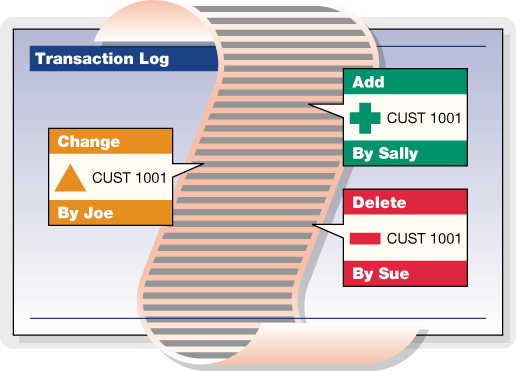
The following types of information can be gathered from the transaction logs:
- A particular record position of a specified data file.
- A particular, unique key value of a specified index.
- All updates to a specified file.
- Updates from particular user ID and/or node name.
- Some combination of the above.
TransactionHistory Basic Operation
TransactionHistory() can be used on-line, interrogating current files and transaction logs as part of an active application. It can also be used off-line, examining a set of data, index, and log files saved from a single-user or client-server application. When scanning backward, TransactionHistory() looks for both active log files, ending with .FCS, and for inactive log files, ending with FCA.
TransactionHistory() makes four types of calls. The first two are search calls returning log entries. The third specifies a beginning log number, and the last resets the history state, permitting a new set of history calls. These calls can be characterized as follows:
| First search call | Specifies the search characteristics and the return information type. This call returns the first entry in the log satisfying the search criteria. |
| Subsequent search calls | Returns the next entry satisfying the search criteria. Do not specify the search criteria or the return information type. These are specified in the first search call. Specify an output buffer address and length on every search call. |
| Preliminary log call | Only specifies a beginning log number. |
| Terminating call | Cleans up the current history set permitting a new set of history calls starting with a new first search call. |
For on-line use, make a first search call, then make subsequent search calls. An on-line search works backward through the files, beginning with the current log position.
For an off-line utility, use TransactionHistory() almost the same as an on-line search, except an optional preliminary log call can specify the starting log number. Off-line searches may be either forward or backward through the logs. While backward searches are the most common, if additional log files have accumulated since the data and index files were saved, a forward search can be meaningful.
Beginning with V6.7, the file create, open, and close entries in the log carry a time stamp permitting TransactionHistory() to locate the appropriate position in the log to begin off-line searches. However, when not specifying an explicit file, the beginning log number, set with a preliminary log call, helps narrow the TransactionHistory() search.
When TransactionHistory() returns a non-zero error code, it automatically frees internal memory allocated to the current history set and resets the history status to allow a new history set. No terminating call is required. When no more information in the transaction logs satisfies the search criteria, TransactionHistory() returns HENT_ERR (618). A first search call made before the log entries for the current history set are exhausted and before a terminating call is made returns HMID_ERR (622).
To switch to a new set of history calls before exhausting all log entries in the current history set, either terminate the existing history set, or use multiple history sets. See Multiple History Sets under Advanced Operations.
Preliminary log calls and terminate calls appear as follows:
TransactionHistory(-1, (pVOID)0, (pVOID)0, recbyt, (VRLEN)0, ctHISTlog);Where recbyt is set to the beginning log number on a preliminary log call, or where recbyt is set to 1L to terminate the current history set.
Subsequent search calls appear as follows:
TransactionHistory(-1, (pVOID)0, bufptr, (LONG)0, bufsiz, ctHISTnext);Where bufptr points to the output buffer and bufsiz specifies the length of bufptr.
A first search call mode includes ctHISTfirst. If searching forward through the logs, ctHISTfrwd must be OR-ed into mode, otherwise it defaults to backward. The three types of matching or search criteria include:
ctHISTpos |
Matches the data record position, with a recbyt of zero matching all data record positions. |
ctHISTkey |
Matches the key value, with a null target matching all key values. |
ctHISTuser and/or ctHISTnode
|
Matches user ID or node name respectively, with an empty string target matching all user ID’s. |
A first search call must use exactly one of these three matching criteria: (1) ctHISTpos, (2) ctHISTkey, or (3) one or both of ctHISTuser and ctHISTnode. Any of the three can be used to specify the search criteria over specific files, signified by a non-negative filno). In a search over all files, signified by a filno of -1, ctHISTpos and ctHISTkey are not used, but one or both of ctHISTuser and ctHISTnode must OR-ed in. In all cases, either ctHISTdata or ctHISTindx must specify the return type. The following table gives the interpretation of mode, filno, target, and recbyt in the first search call:
Note The first 6 column headings in the following table should be prefaced with ctHIST, i.e., pos is ctHISTpos, key is ctHISTkey, etc.
Possible First Search Call Combinations
| p o s |
k e y |
u s e r |
n o d e |
d a t a |
i n d x |
filno | target | recbyt | interpretation |
|---|---|---|---|---|---|---|---|---|---|
| a | a | x | -1 | userID | zero | Return all data entries for all data files updated by matching user. | |||
| a | a | x | -1 | userID | zero | Return all index entries for all index files updated by matching user. | |||
| x | x | Data | NULL | zero | Return all data entries for specified data file. | ||||
| x | x | Data | NULL | non-zero | Return data entries matching recbyt for specified data file. | ||||
| a | a | x | Data | userID | zero | Return all data entries for specified data file made by matching user. | |||
| a | a | x | Data | userID | non-zero | Return data entries matching recbyt for specified data file made by matching user. | |||
| x | x | Indx | key | zero | Return all data entries with index matching key*. | ||||
| x | x | Indx | key | non-zero | Return all data entries with index matching key and recbyt**. | ||||
| x | x | Indx | NULL | zero | Return all index entries for specified index file. | ||||
| x | x | Indx | NULL | non-zero | Return all index entries for specified index file which match recbyt. | ||||
| x | x | Indx | NULL | non-zero | Return all data entries with index matching recbyt for specified index file. | ||||
| a | a | x | Indx | userID | zero | Return all index entries for specified index file made by matching user. | |||
| a | a | x | Indx | userID | non-zero | Return all index entries for specified index file that match recbyt and made by matching user. |
Note:
| x | Indicates the bit is turned on in mode. |
| a | (active) indicates one or more of these bits is turned on. |
| * | Index matching key means the key value for the data record matches target for the specified index file. |
| ** | an index entry matching recbyt means the index entry points to a record offset matching recbyt. |
Two additional mode bits may be OR-ed in: ctHISTinfo and ctHISTnet.
-
ctHISTinforeturns the user ID and node name of the process which made the log entries in the form of a null terminated ASCII string with a vertical bar (‘|’) preceding the node name, if present. This user information is in addition to the data or index information requested. - For searches of specific files with specific matching criteria, i.e., a non-null target for an index or a non-zero
recbytfor a data file,ctHISTnetreturns only the net affect of each transaction, not each individual update within the transaction.
When mode includes ctHISTuser or ctHISTnode, pass the user ID in target as a null terminated ASCII string. If only ctHISTuser is on, target is case insensitive, corresponding to the user ID’s specified during logon to a FairCom Server. If only ctHISTnode is on, target is case sensitive, corresponding to the node name set by SETNODE(). If both ctHISTuser and ctHISTnode are on, target is a single null-terminated composite string beginning with a case insensitive user ID, a vertical bar (‘|’), and a case sensitive node name. To match all users, turn on ctHISTuser and set target to an empty string (“”), not a null pointer. If no user ID exists, TransactionHistory() appends a null byte to the data or index information.
The Transaction History feature is enabled by default, but may be disabled by adding #define NO_HISTORY to ctoptn.h/ctree.mak.
TransactionHistory Output
As outlined above, the output buffer contains the following information after a successful first search call or subsequent search call:
- A 40-byte history header.
- An optional record header for variable-length data records, superfile member data records, and resources in fixed or variable-length data files.
- The key value or data record entry.
- A null terminated string with the user ID and node name of the process which made the log entry, when requested using
ctHISTinfo. - A null terminated file name, when
filnoequals 1.
The TransactionHistory() header is an instance of the 40-byte HSTRSP structure, defined in ctport.h, composed of the following fields:
LONG tranno;   /* transaction number                           */
LONG recbyt;   /* log entry data record byte offset            */
LONG lognum;   /* the log number for the entry                 */
LONG logpos;   /* the offset within the log for the entry      */
LONG imglen;   /* the length of the data or key value returned */
LONG trntim;   /* the time stamp for the transaction           */
LONG trnfil;   /* the internal file number for the log entry   */
LONG resrvd;   /* reserved for future use                      */
UCOUNT membno; /* the index member number                      */
UCOUNT imgmap; /* details concerning the data returned         */
COUNT trntyp;  /* the type of transaction log entry            */
COUNT trnusr;  /* internal user number which made the entry    */
Each data and index entry in a transaction log belongs to a particular transaction. Each such transaction is assigned a unique number. This transaction number is returned in tranno. Each data and index entry is for a particular file at a particular data record location. recbyt contains this data record location, expressed as a byte offset from the beginning of the file. trnfil contains the unique file number assigned to each data and index file upon their creation or actual opening. Each time a file is opened, it is assigned a new file number. trntim contains the commit time of the transaction. In the event that this commit time cannot be determined, it is set to zero.
It is very important to note that more than one actual log entry may be combined in order to return an image of a data record. Variable-length data records and resources are composed of a header and the actual data. These components are written to the log separately, and must be combined to generate a coherent data entry. Further, a scan of the log based on an index file returning the corresponding data information may require more than one log entry to generate the returned data entry. Therefore, the lognum, logpos, and trntyp fields in the history header reflect only one of possibly several log entries combined to create the return information.
The imglen field contains the length of the key value or data record image returned in the output buffer just following the 40-byte history header. imglen includes the length of an optional record header before the data or resource image, if it is present. imglen does not include the length of the user ID and/or file name appended to the end of the key value or data record image. These null terminated ASCII string fields follow immediately after the key or record image.
When a record header is present, the lowest order byte of imgmap contains the length of the record header. To determine the length of the record header, you must AND (‘&’) imgmap with ctHISTmapmask. When using ctHISTnet, if the transaction resulted in the delete of the data record in question, ctHISTkdel is set in imgmap, signifying that the deleted key value, not a data record image has been returned.
When filno equals 1 on a first search call, returning entries for all data or index files, one of the following bits of the imgmap field will be set:
-
ctHISTdatfile- fixed-length data file entry -
ctHISTidxfile- index file entry -
ctHISTvarfile- variable-length data file entry
In addition to one of these bits being set in imgmap, the file name of the index or data entry returned is appended to bufptr, see TransactionHistory() Output. If the appended file is an index file, membno contains the index member number for that file. The host index is member number zero.
The position of the log entry in the transaction logs is specified by the log number, lognum, and the offset, logpos, of the entry within the log.
Each log entry is made by a specified user. A non-unique user number is assigned to each logon until logoff. At logoff, the user number may be reassigned to another logon. trnusr contains this internal, non-unique user number.
Each log entry is assigned a transaction type. This type number determines how to interpret the contents of the transaction log entry and is returned in trntyp. The following transaction types relevant to TransactionHistory() are found in ctopt2.h:
| Transaction Type | Description |
| LADDKEY | add key value |
| LDELKEY | delete key value |
| NEWLINK | delete stack link |
| NEWIMAGE | new record image |
| OLDFILL | old image ff filled |
| OLDIMAGE | old record image |
| DIFIMAGE | old/new difference image |
| LOGEXTFIL | extend file |
| NODEXTFIL | extend file |
TransactionHistory Advanced Operation
The FairCom DB Transaction History feature provides advanced options for monitoring transaction controlled files, such as an optional record header and multiple history sets.
Optional Record Header
When a first or subsequent search call returns a data record from a variable-length data file, a data file member of a superfile, or a resource record, the data is almost always preceded by a record header. The only exception would be if TransactionHistory() could not find or properly relate the log entries needed to create the composite header and actual data image. The least significant byte of imgmap contains the length of the record header. Typical length values are:
- 0 - no record header
- 10 - variable-length record header
- 18 - superfile record header
- 22 - resource record header
The first 10 bytes of each header is comprised of:
- 2-byte record mark
- 4-byte total length
- 4-byte utilized length
The record mark is 0xFAFA for an active data record, 0xFDFD for a deleted data record, and 0xFEFE for a resource record. Typically, a fixed-length data record in a superfile will have a header record mark of 0xFAFA whether active or deleted. Look at the first byte of the actual data record to determine if it is active or deleted. A deleted fixed-length data record begins with a 0xFF byte.
The total length is the space used by the header, the actual data image, plus any extra space not currently used by the record. The utilized length is the length of the actual data not including the header or any extra space. In a properly configured file, moving from the first byte of the record header by the total length should place you on the first byte of the next record in the file. TransactionHistory() usually returns the entire total length of the data image, not just the utilized length.
Multiple History Sets
Multiple history sets are possible. They analogous to multiple sequential sets, contexts and batches. ChangeHistory() permits an application to maintain any number of history sets, where a set is defined to exist when either a first search call or preliminary log call returns successfully. FairCom DB allocates a history state structure for each history set, not the same as the 40-byte HSTRSP structure. ChangeHistory() takes an arbitrary short integer as its input argument. That is, the application can assign history set ID numbers in any manner it wishes. However, the history set ID number of zero is reserved for the default history set that exists whether or not ChangeHistory() is called. ChangeHistory() returns a zero on success.
FreeHistory() frees memory associated with multiple history sets. It is not necessary to call FreeHistory() since either FairCom DB termination call, CloseISAM() or StopUser(), will automatically invoke FreeHistory(). However, if the amount of allocated memory needs to be reduced prior to termination, FreeHistory() is available.
Delayed Durability Transaction Processing
Terminology:
The term “log flush” refers to c‑tree writing its transaction log buffer to the file system cache, and the term “log sync” refers to c‑tree instructing the system to write updates from the file system cache to the disk.
Delayed Durability Transaction Processing
With full transaction control for complete ACID compliance, transaction logs are synced to disk with each commit operation, ensuring absolute data integrity with complete recoverability. Full durable ACID transaction control enables many powerful features not available without the availability of recoverable log data:
- Automatic database recovery
- Live database backups without rebuild on restore
- Replication
- Transaction auditing
The most critical of these is automatic recovery in case of system failure. However, full transaction control remains a critical area of database performance tuning. Database updates must be secured in write-ahead logs for guaranteed recoverability. This comes with a performance impact due to the synchronous I/O requirements ensuring data is safely persisted.
Many applications could benefit from a "relaxed" mode of transaction log writes. With today's hardware and power redundancies, it is conceivable to slightly relax full durability constraints and still maintain an acceptable data risk tolerance. The balance becomes "how much loss of recoverability can these systems tolerate?"
Allowing database administrators to balance their window of vulnerability against online performance, FairCom DB provides a new Delayed Durability feature for transaction logs.
| Full Recoverability | Preimage (Atomicity Only) | Non-Transaction Mode |
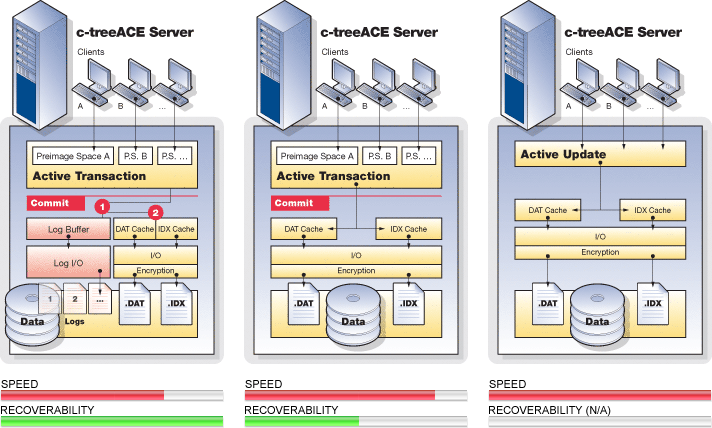
This new transaction operation mode allows its FairCom DB transaction log updates to remain cached in its in-memory transaction log buffer as well as in file system cache, even after a transaction has committed. The challenge is to avoid index and disk updates from reaching disk before the transaction entries do. FairCom has managed to delay transaction log writes to persisted storage while guaranteeing these transaction log entries for a given transaction write to disk before any data file updates associated with that transaction are written to file system cache or to persistent storage with a modified log sync strategy. In addition, a background thread guarantees an upper bound on the total amount of time any transaction remains in a non-synced state.
This feature is enabled with the following configuration entry and takes as an argument the maximum number seconds, N, that will elapse between log syncs. This ensures that, after a commit, the transaction log will be synced in no more than N seconds, thereby allowing you to define your window of vulnerability risk.
DELAYED_DURABILITY <N>The end result can approach non-transaction performance while ensuring committed transactions to persisted storage to within less than N seconds of vulnerability. Values as low as one (1) second are shown to provide the best performance. In selected test cases, up to 300% faster transaction throughput has been observed. Higher values have been found to offer little, if any, additional benefit.
Detailed Description of Behavior
In the new Delayed Durability mode of operation, FairCom Server allows its transaction log updates to remain cached in the in-memory transaction log buffer and in file system cache after the transaction has committed. c‑tree guarantees that transaction log entries for a given transaction are on disk before any data file updates associated with that transaction are written to file system cache or to disk.
Original Transaction Log Flush/Sync Behavior
While a transaction is pending (prior to its commit), changes made to data files are held in user-specific memory called preimage space. When the transaction commits, the changes are copied from preimage space to c‑tree’s data cache.
Updates to key values for transaction-controlled files are performed immediately during a transaction. The key values are marked to indicate that the changes are pending commit. These key-level marks allow the transactor (the connection that is executing the transaction) to see the updated key values as active, while other connections see the updated key values as pending (not yet committed).
When a transaction commits, c‑tree writes to the transaction log and data files in this order:
- Write transaction log entries to disk. An ENDTRAN entry in the log signifies that all the log entries for that transaction are on disk. c‑tree ensures that the log entries for the transaction are both flushed from c‑tree’s transaction log buffer to the file system cache and synced from the file system cache to disk. When the transaction commit call returns to the caller, the existence of the transaction log entries on disk guarantees that the transaction is recoverable.
- Write data file updates to c‑tree’s data cache and/or to disk. Depending on the options that are in effect for the file or for the database engine, this step will either write the data file updates to c‑tree’s data cache or write the changes to file system cache or to disk. It is not required that the changes to the data files are on disk when the transaction commits, because the transaction log entries can be used to redo the transaction if c‑tree terminates abnormally before the updates to the data files are known to be on disk (which can be sometime after the transaction commits).
- Mark the transaction as completed. This step causes other connections to view the key level locks as committed rather than pending commit.
- Unlock records. This step allows other connections to lock and update the records that the transaction touched, if desired.
Modified Log Sync Strategy
Enabling the Delayed Durability feature activates a modified log sync strategy. Ordinarily, when a transaction commits, FairCom DB does not return from a TRANEND() call until log entries associated with the transaction have been written to persisted storage (e.g., your disk drive). With the new modified log sync strategy enabled only the following is ensured:
Before any data or index image is written to disk, all associated log entries are on disk.
With this modified log sync, in an extreme case, a transaction could be committed without any associated log entries on disk. Or a TRANBEG may be on disk, but not a corresponding TRANEND. This means c-tree cannot guarantee recovery of all transactions that have returned a successful commit.
When Delayed Durability is active, the link between committing a transaction and syncing the transaction log to disk is de-coupled, and the number of log syncs is greatly reduced. Additional logic ensures that before c-tree data or index contents are written to disk, all necessary log entries are on disk. If log information is cached after a commit, the log will not necessarily be synced to persisted storage, leaving a small vulnerable window for data loss potential in case of system failure.
The Delayed Durability time window configuration is an added FairCom DB internal operations thread ensuring transaction log data is periodically synced on a regular basis. This log sync thread coordinates the transaction log sync to disk and guarantees that no more than N seconds can pass without a log sync to persisted storage. This thread wakes periodically and syncs accumulated transaction log data before the DELAYED_DURABILITY value is exceeded. A setting of 1 second is recommended as it provides excellent performance gains with minimal window of data loss in event of system failure.
Note The transaction log buffer is always flushed when full. This buffer is defined as a 64K buffer. Any number of updates exceeding 64K will always trigger a log buffer sync to disk.
Delayed Durability Behavior
When the configuration option DELAYED_DURABILITY is specified in ctsrvr.cfg with a value greater than 0, FairCom Server does not sync its log buffer simply because a transaction commits. Instead, it syncs the log buffer if it becomes full, or if a write to the data cache requires the log buffer to be flushed to disk, or if the maximum defer time in seconds specified by the keyword is exhausted.
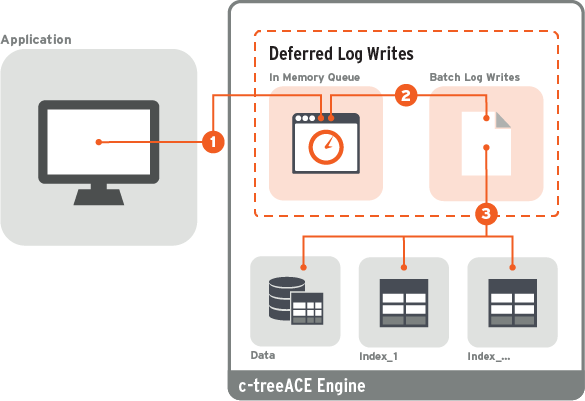
When this feature is in effect, a transaction commit writes to the in-memory transaction log buffer and data files in the following order:
- Write transaction log entries to the in-memory transaction log buffer. The log entries are copied to the in-memory transaction log buffer and remain in the buffer until the log buffer becomes full or until a write to a transaction-controlled data or index file requires the log buffer to be written to disk. When the transaction commit call returns to the caller, there is no guarantee that the transaction log entries are on disk, and so the transaction is not guaranteed to be recoverable.
- Write data file updates to c‑tree’s data cache and/or to disk. Depending on the options that are in effect for the file or for the database engine, this step will either write the data file updates to c‑tree’s data cache or write the changes to file system cache or to disk. It is not required that the changes to the data files are on disk when the transaction commits, because the transaction log entries can be used to redo the transaction if c‑tree terminates abnormally before the updates to the data files are known to be on disk (which can be sometime after the transaction commits).
- Mark the transaction as completed. This step causes other connections to view the key level locks as committed rather than pending commit.
- Unlock records. This step allows other connections to lock and update the records that the transaction touched, if desired.
FairCom DB tracks the highest log position assigned to the contents of a data cache page for those items in preimage space that correspond to a data record. When a data-cache page is about to be written to the file system, c‑tree checks if the last log byte synced to disk includes the highest required log position for the data cache page. If not, c‑tree flushes the log buffer to the file system cache and syncs the file system cache to the transaction log file on disk.
Configuration Entries for Delayed Durability
DELAYED_DURABILITY <N> (default 0) controls whether or not to use a modified log syncing strategy.
With delayed durability enabled transaction logs are no longer sync'd to persisted storage on each commit (or other internal log buffer flush events) and instead, transaction log data is allowed to be written to the filesystem cache, and a background thread then periodically and consistently syncs transaction log contents to disk.
By allowing committed transaction entries to be written to filesystem cache and deferring the file flush can result in a very large performance gain in many cases. However, there is a trade off as a window of potential data loss vulnerability is then introduced. The period of time that transaction log contents are present in volatile filesystem cache before the flush could mean transactions already reported to the application as committed, in rare cases, might not make it to persisted storage.
With many modern storage devices there is a limited presumption that available capacitance on the system and storage device hardware that data is usually persisted even in a power outage situation, though this is not guaranteed. Thus alternate recovery strategies should be considered.
One strategy to coordinate the known state of committed database transactions with a known application state can be achieved with restore points. Restore points can be triggered by an application to create a known point in time where the application and the database are in sync. A restore point creates a special database transaction log checkpoint that can be later referenced by the application as a known good start point.
With delayed durability enabled, it is recommended to consider the use of restore points for a robust recoverable solution.
- When
DELAYED_DURABILITYset to 0 disables delayed durability/ - When
DELAYED_DURABILITYis set to a positive value, <N>, the new strategy is in use and the log sync is guaranteed to occur within <N> seconds. A setting of 1 second is recommended because it results in a good performance gain (higher values offer very little additional benefit). The following configuration options are set as shown below:
SUPPRESS_LOG_FLUSH |
YES | (no idle flush of transaction files) |
SUPPRESS_LOG_SYNC |
YES | |
IDLE_TRANFLUSH |
-1 | |
COMMIT_DELAY |
-1 | (no commit delay) |
FORCE_LOGIDX |
ON | (all transaction indices use ctLOGIDX) |
Note If the configuration file has one or more of these configuration entries set inconsistently after the DELAYED_DURABILITY entry, the server logs a message to CTSTATUS.FCS and continues to start, disabling any incompatible options after processing the configuration file.
Warning
When DELAYED_DURABILITY is enabled, recently committed transactions could be lost if FairCom Server terminates abnormally. For automatic recovery to succeed after FairCom Server terminates abnormally, either of the following should be considered.
- The application must write a restore point to the log (using the
ctflushutility or callingctQUIET()with mode ofctQTlog_restorepoint) such that a restore point exists prior to the time the server terminated abnormally. In this case, automatic recovery recovers to that restore point.
or -
ctsrvr.cfg must contain the option
RECOVER_TO_RESTORE_POINT NO, indicating that no restore point is needed. In this case, automatic recovery recovers to the last data that was written to the log on disk. This is the default configuration.
See Also
Performance Gains
Tests were run to compare the new Delayed Durability transaction mode with the existing transaction processing mode using DELAYED_DURABILITY 1, allowing the log sync to be deferred for 1 second. The results indicated that the new Delayed Durability achieved performance gains of a factor of 2 to 3 over the previous transaction processing. A setting of 1 second is recommended because it is enough for a good performance gain and higher values offer very little additional benefit.
The chart below shows performance of the new Deferred Durability transaction mode (red) and the existing standard transaction processing mode (blue):
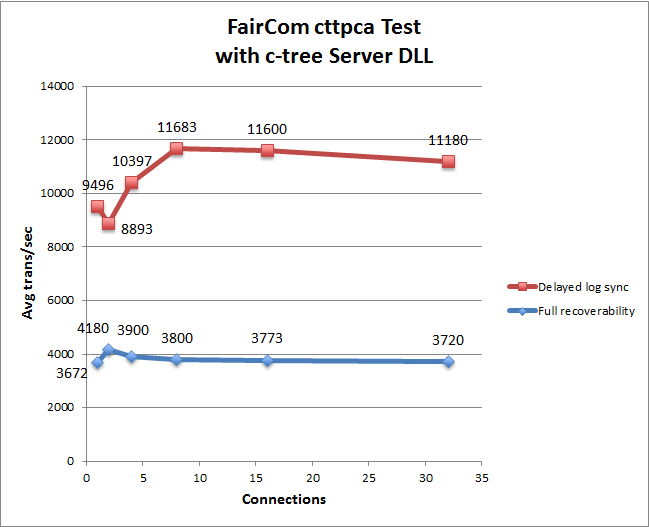
The data was acquired using the FairCom cttpca test. This test was run for 30 seconds using server DLL with varying numbers of connections. New files were created before each test run. For this test, c‑tree data and index caches were large enough to hold all records and index nodes.
The existing transaction processing is referred to as "full recoverability" because all transactions can be recovered. The new Deferred Durability technique can be used with Restore Points to allow the data to be rolled back to a known good state.
SNAPSHOT
SNAPSHOT statistics data collection related to transaction log flushing have been updated as follows:
- The LOG FLUSH REQUESTS includes a “data cache” value which is the number of log flushes instigated by the Delayed Durability requirement that no data image will go to disk until the log entries associated with the image have been flushed to disk. It includes a “# checks if ...” that shows the number of times a data cache write operation checked to see if a log flush was required.
- A new section, DATA CACHE LOG FLUSH REQUEST DETAILS, breaks down the data cache flush requests into the operations that trigger the flush.
Below are excerpts from three different SNAPSHOT.FCS files:
- The first using
DELAYED_DURABILITY On, which setsFORCE_LOGIDX ON - The second with
DELAYED_DURABILITY OFFandFORCE_LOGIDX ON - The third without
DELAYED_DURABILITY OFFandFORCE_LOGIDX OFF
The same single-threaded application program was run that adds 100,000 ISAM records, each with three indices, and each add is in a transaction.
Recall that when an index has a file mode with ctLOGIDX enabled, additional transaction log entries permit automatic recovery to repair a damaged index at the site of the damage instead of rebuilding the entire index. ctLOGIDX affects the log flushing dynamics.
SNAPSHOT statistics can be output with the ctstat Statistics Utility -text option.
DELAYED_DURABILITY, which sets FORCE_LOGIDX ON
| |
|
¬ New statistic |
|
¬ New statistic |
|
¬ New section breaks down data cache value above
|
DELAYED_DURABILITY OFF and FORCE_LOGIDX ON
| |
|
|
DELAYED_DURABILITY OFF and FORCE_LOGIDX OFF
| |
|
|
Comparison
Comparing the three different SNAPSHOT files reveals the following:
- The total number of log flushes is significantly lower with Delayed Durability on.
- The reduction in total log flushes is primarily from eliminating the requirement to ensure log entries are on disk before a transaction commit can return.
- LOGIDX causes a significant number of log flushes. However, when LOGIDX is not used, other flushing requirements imposed by indices still generate a comparable number of log flushes related to TRANBEG entries getting flushed.
- The data cache impact on the number log flushes is quite small.
Monitoring Delayed Durability Data Cache Writes
Statistics that indicate the number of log sync calls caused by a data cache page being written to disk are available in the ctGSMS SNAPSHOT structure and these stats are included in SNAPSHOT output. Use ctstat ‑text to write statistics to SNAPSHOT.FCS.
Example
# checks if cache write forces log flush: 11889

    DATA CACHE LOG FLUSH REQUEST DETAILS
                    cache aging: 0
 updated page to be re-assigned: 0
            flush on file close: 187
                     checkpoint: 0
                        CTFLUSH: 3
                    ctrbktfls(): 0
                          other: 1111
Guarantee Transaction Log Sync by Time Interval
With the introduction of Deferred Durability, this new feature offers a means to ensure that the transaction log is flushed periodically. A new configuration entry was created to indicate the maximum amount of time that will elapse between log flushes:
DELAYED_DURABILITY <N>This keyword takes as an argument the maximum number seconds, N, that will elapse between log flushes. This in turn ensures that after a commit, the log will be flushed in no more than N seconds.
If DELAYED_DURABILITY is used when deferred Durability is not active, one of these two notices will be in the status file:
NOTICE: DELAYED_DURABILITY in use, while MIN_LOG_SYNC not in use
NOTICE: DELAYED_DURABILITY in use, without ctFeatLOGFLUSH_MOD support
Automatic Recovery Considerations
As noted previously, Delayed Durability affects automatic recovery. The following outcomes of automatic recovery are possible after a server crash that occurred when the feature was enabled:
-
Active Restore Points exist and
RECOVER_TO_RESTORE_POINTisYES:
All transactions committed before the Restore Point are recovered, and any transactions committed after the Restore Point are undone. -
Active Restore Points exist and
RECOVER_TO_RESTORE_POINTisNO:
All transactions committed before the Restore Point are recovered, but some transactions committed after the Restore Point may have been recovered and others lost. -
Active Restore Points exist and
RECOVER_TO_RESTORE_POINTis not in the configuration file:
All transactions committed before the Restore Point are recovered, but some transactions committed after the Restore Point may have been recovered and others lost; then the server terminates with aNORB_ERR. The next server startup will detect that a rollback to the last active Restore Point is pending. AddRECOVER_TO_RESTORE_POINT YESorNOto the configuration to successfully restart the server.
Note If automatic recovery has completed the first stage of recovery (i.e., all transactions committed before the crash whose log entries made it to disk are recovered), but the server does not complete the second stage of rolling back to the last Active Restore Point; then the next server startup will detect the pending rollback.
Upon successful rollback to the last Restore Point, the Restore Point log entry is modified to include the skip forward location in the log. The skip forward location stored in the Restore Point permits a roll forward operation to skip over transactions that have been undone because of a prior rollback to the Restore Point.
Note The modification of the Restore Point log entry is the only time c-tree changes an existing log entry. To avoid permanently corrupting the log containing the Restore Point in the unlikely event that the log update operation fails, the log is copied before attempting to modify the Restore Point entry. The copied log has a name in the form:
LNNNNNNN.FCS.YYYYMMDD_HHMMSS
where NNNNNNN is the log number, and the date and time in the name correspond to the system time at which the log was copied. These copied log files are NOT deleted by the server.
Time limit on flushing updated data and index cache pages for TRNLOG files
An earlier revision introduced threads that flush updated data and index cache pages for non-transaction-controlled files to ensure updates to those files were written to the file system within a configurable time limit. This revision extends this support to TRNLOG files.
The following c-tree Server configuration options set the time limit in seconds that a data cache page or index buffer can remain dirty before it is written to the file system cache. The default time limit is 60 seconds.
TRAN_DATA_FLUSH_SEC          <time_limit_in_seconds>
TRAN_INDEX_FLUSH_SEC         <time_limit_in_seconds>
- Specify
IMMEDIATEto cause dirty pages to be written immediately. - Specify
OFFto disable the time limit-based flushing.
(The NONTRAN_DATA_FLUSH_SEC and NONTRAN_INDEX_FLUSH_SEC configuration options still work and apply to the non-tran flush threads.)
These options can be changed using the ctSETCFG() API function and using the ctadmn utility.
This feature causes c-tree Server to create four threads when it starts up. One thread flushes dirty pages for non-transaction data files, one thread flushes dirty buffers for non-transaction index files, one thread flushes dirty pages for TRNLOG data files, and one thread flushes dirty buffers for TRNLOG index files. The threads always exist, even if the feature is disabled.
If the time limit is set to OFF, the threads simply wait for the time limit to change.
When the time limit is enabled, each thread reads its updated page list from oldest to newest entry: we added a tail pointer to the update lists for this purpose; and we added a field to hold the timestamp of the first update to each page. Based on the timestamp of the oldest page and the number of entries in the oldest two counter buckets (if they are being used), we decide how long to defer after each 10 pages that we flush.
When this feature is enabled at compile time, the idle flush thread feature is disabled.
When this feature is enabled at runtime, aging for updated TRNLOG file data cache pages and index buffers is disabled.
Snapshot Changes
In V11 and later, fields have been added to the system snapshot structure (ctGSMS) to hold the background TRNLOG flush settings and statistics. These values are now included in the text snapshot. The ctGSMS structure version has been changed from 17 to 18 to indicate the presence of these fields. These new fields, and the fields that were added for non-tran flush feature, are defined as fields in the bgflss[] array of structures in ctGSMS.
Non-TRNLOG background file flush fields:
type  name                        description
----  ----                        -----------
LONG  bgflss[BGFLSNT].sctntdlmt   time limit for dirty non-transaction data pages
LONG  bgflss[BGFLSNT].sctntdmax   highwater time for dirty non-transaction data page
LONG  bgflss[BGFLSNT].sctntdage   current oldest dirty non-transaction data page
LONG8 bgflss[BGFLSNT].sctntdfls   number of non-transaction data page flushes
LONG  bgflss[BGFLSNT].sctntdbkt   non-transaction data page counter buckets (nominal)
LONG  bgflss[BGFLSNT].sctntdbkc   non-transaction data page counter buckets (current)

LONG  bgflss[BGFLSNT].sctntilmt   time limit for dirty non-transaction index buffers
LONG  bgflss[BGFLSNT].sctntimax   highwater time for dirty non-transaction index buffer
LONG  bgflss[BGFLSNT].sctntiage   current oldest dirty non-transaction index buffer
LONG8 bgflss[BGFLSNT].sctntifls   number of non-transaction index buffer flushes
LONG  bgflss[BGFLSNT].sctntibkt   non-transaction index buffer counter buckets (nominal)
LONG  bgflss[BGFLSNT].sctntibkc   non-transaction index buffer counter buckets (current)
TRNLOG background file flush fields:
type  name                        description
----  ----                        -----------
LONG  bgflss[BGFLSTR].sctntdlmt   time limit for dirty TRNLOG data pages
LONG  bgflss[BGFLSTR].sctntdmax   highwater time for dirty TRNLOG data page
LONG  bgflss[BGFLSTR].sctntdage   current oldest dirty TRNLOG data page
LONG8 bgflss[BGFLSTR].sctntdfls   number of TRNLOG data page flushes
LONG  bgflss[BGFLSTR].sctntdbkt   TRNLOG data page counter buckets (nominal)
LONG  bgflss[BGFLSTR].sctntdbkc   TRNLOG data page counter buckets (current)

LONG  bgflss[BGFLSTR].sctntilmt   time limit for dirty TRNLOG index buffers
LONG  bgflss[BGFLSTR].sctntimax   highwater time for dirty TRNLOG index buffer
LONG  bgflss[BGFLSTR].sctntiage   current oldest dirty TRNLOG index buffer
LONG8 bgflss[BGFLSTR].sctntifls   number of TRNLOG index buffer flushes
LONG  bgflss[BGFLSTR].sctntibkt   TRNLOG index buffer counter buckets (nominal)
LONG  bgflss[BGFLSTR].sctntibkc   TRNLOG index buffer counter buckets (current)
A text snapshot includes these values in the SNAPSHOT.FCS file, and the ctsnpr utility has been updated so that it can parse this new SNAPSHOT.FCS file format.
Counter Buckets
These c-tree Server configuration options set the number of counter buckets for the dirty data page and index buffer lists:
TRAN_DATA_FLUSH_BUCKETS      <number_of_buckets>
TRAN_INDEX_FLUSH_BUCKETS     <number_of_buckets>
The default number of counter buckets is 10. Setting the option to zero disables the use of the counter buckets.
(The NONTRAN_DATA_FLUSH_BUCKETS and NONTRAN_INDEX_FLUSH_BUCKETS configuration options still work and apply to the non-tran flush threads.)
Other Changes
The configuration option DIAGNOSTICS NONTRAN_FLUSH has been changed to DIAGNOSTICS BACKGROUND_FLUSH. This option enables logging of flush thread operations to the file BGFLS.FCS.
The configuration option DIAGNOSTICS NONTRAN_FLUSH_BUCKETS has been changed to DIAGNOSTICS BACKGROUND_FLUSH_BUCKETS. This option enables logging of flush counter bucket statistics to the file BGFLSBKT.FCS. Each time a text snapshot is written to the file SNAPSHOT.FCS, the bucket statistics are written to the file BGFLSBKT.FCS.
Restore Points
A Restore Point is a position in a transaction log to which FairCom Server’s automatic recovery can roll back the system if FairCom Server terminates abnormally. Restore points are useful for restoring the system to a point in time defined by the application as a known good state.
Restore points are important when using the new Delayed Durability mode because it relies on caching and less frequent syncing of those caches to disk.
A Restore Point is a “clean point in time” when the log and all transactions are guaranteed to be synchronized and everything has been written to disk.
If FairCom Server terminates abnormally while transactions are active or updated transaction-controlled files are open, a configuration keyword causes it to complete automatic recovery and roll the transaction-controlled data and index files back to the most recent Restore Point.
Restore Point Overview
By reducing the need to sync the transaction log to disk, this new transaction processing mode can improve performance substantially. The tradeoff is that automatic recovery is not guaranteed to make good on all the committed transactions. To make recovery predictable and usable, we introduce the concept of a Restore Point (RP). A Restore Point is a place in a transaction log that has no active transactions. Two types of Restore Points are available:
-
Lightweight Restore Point: A
RSTPNT(restore point) log entry is a placeholder where no transactions are active. -
Checkpoint Restore Point: A
CHKPNT(check point) log entry is a place at which no transactions are active.
Every N minutes (where N is a small number), the application will issue a lightweight checkpoint, and before restarting transactions, start an external activity log. If a crash occurs, it is possible to recover to the last Restore Point, and redo the activities in the external log.
A Checkpoint Restore Point provides a clean place in the log where roll forwards from a Dynamic Dump can stop and restart. Imagine that a system in operation runs a complete dynamic dump, and then periodically (each hour, each day, etc.) issues a Checkpoint Restore Point. A backup system can be maintained in fairly up-to-date fashion by using the Checkpoint Restore Points as convenient milestones to roll forward from and roll forward to.
Creating Restore Points
Restore Points are created using the ctQUIET() API function. A Restore Point can be either a Lightweight Restore Point (RSTPNT) or a Restore Point with a full Checkpoint Restore Point (CHKPNT).
Lightweight Restore Point
To establish a Lightweight Restore Point, call:
ctQUIET(NULL,timeout,ctQTlog_restorepoint)This call blocks new transactions from starting and waits for up to timeout seconds before aborting pending transactions.
The timeout parameter indicates the number of seconds ctQUIET() will wait for transactions to complete before aborting active transactions. If all the active transactions complete before timeout seconds, then no transactions will be aborted and the Restore Point will be written as soon as possible. When ctQUIET() is called, new transactions are immediately blocked, and ctQUIET() will not write the Restore Point in the log until all transactions complete or are aborted.
When all transactions have been committed or aborted, it writes a log entry with transaction type of RSTPNT. The log entry contains the time of the Restore Point and the name of the file that contains the log number and offset of the Restore Point entry. The formatting and naming of the Restore Point file is explained in Restore Point Files.
FairCom Server guarantees that each Restore Point has its own unique timestamp by ensuring that successive Restore Points have a minimum interval of at least 5 seconds. As a matter of efficiency, we would expect the actual interval between Restore Points to be much longer than a few seconds; more likely an interval on the order of 5 minutes or longer. The interval is under the control of the application.
The advantage of creating a Restore Point using ctQTlog_restorepoint without ctQTlog_checkpoint is that there is much less overhead writing a short RSTPNT log entry compared to creating and writing an entire checkpoint.
Checkpoint Restore Point
To create a Restore Point with a full checkpoint, call ctQUIET() with both ctQTlog_restorepoint and ctQTlog_checkpoint:
ctQUIET(NULL,timeout,ctQTlog_restorepoint | ctQTlog_checkpoint)
As with a lightweight Restore Point, this call blocks new transactions from starting and waits for up to timeout seconds for existing transactions to complete, after which it aborts all transactions that are still pending. Then it writes a checkpoint (with a mode of RESTORE_CHECK) to the transaction log instead of writing a RSTPNT entry and creates a Checkpoint file. The formatting and naming of the Checkpoint file is explained in Restore Point Files.
Note
ctQTlog_restorepointandctQTlog_checkpointcannot be used with any other blocking modes.
Permitting New Transactions
After the ctQUIET() call returns successfully (after either a Lightweight Restore Point or a full Checkpoint Restore Point), call ctQUIET() with an action of either ctQTunblockLogRestore or ctQTunblockALL to permit new transactions:
ctQUIET(NULL,timeout,ctQTunblockLogRestore)
Before calling ctQUIET() a second time to unblock new transactions, it may be desirable to start an external (i.e., separate from FairCom Server) activity log managed by the application. This log can be used to recover updates made after the Restore Point.
Notes
A ctQUIET() call to establish a Restore Point cannot be mixed with any other blocking actions. An application that attempts a TRANBEG after ctQUIET() has been called to establish a Restore Point will be blocked: the TRANBEG will not return from the server until the second call to ctQUIET() is made. An application whose transaction is aborted by the first ctQUIET() call will receive an error return of QTAB_ERR.
Note A minimum interval of 1 second is enforced between calls to establish a Restore Point. While it is very unlikely that anyone would make calls to establish Restore Points with a frequency even approaching 1 second, the
ctQUIET()logic ensures the interval will be at least 1 second. A call toctdefer()sleeps thectQUIETthread if necessary to enforce the time interval.Unless
COMPATIBILITY NONADMIN_QUIETis in the configuration file, a Restore Point can only be established by a client in the ADMIN group.If a client successfully calls
ctQUIET()to establish a Restore Point and then terminates without unblocking new TRANBEG calls through a second call toctQUIET(), the server will force a second call. Ordinarily thectQUIETblocks (for other types of block requests) persist when the blocking thread terminates without issuing an unblock request.
Active Restore Points
The configuration option KEEP_RESTORE_POINTS N, which defaults to 1, specifies the number of Restore Points that FairCom Server considers to be active Restore Points for the purpose of determining which transaction log files must remain active in order to be able to roll back to the Nth most recent Restore Point. When a new Restore Point is created, the oldest Restore Point is no longer considered active.
Note To be able to roll back to a particular Restore Point, c‑tree must keep the transaction log that contains the checkpoint preceding that Restore Point, plus all subsequent transaction logs. Therefore, if you create a Restore Point and never create another Restore Point, all transaction logs from that point forward will be kept as active logs. So when using Restore Points, it is advisable to periodically establish new Restore Points so that FairCom Server can delete older transaction log files.
Automatic restore point logging
FairCom Server supports a configuration option to automatically perform restore points. This option can be set in the configuration file using the SUBSYSTEM TRNLOG AUTO_RESTORE_POINT block. The supported sub-options are:
-
LOG_INTERVAL N, where is the number of logs between each automatic restore point. Specify 1 to write an automatic restore point to every log. Specify 0 to turn off automatic restore points.LOG_INTERVALdefaults to zero (no automatic restore points). -
TIMEOUT T, whereTis a time in seconds that the automatic restore point waits for active to transactions to commit.TIMEOUTdefaults to 2 seconds. -
FAIL_AFTER_TIMEOUT F, can beYESorNO:YESindicates that if transactions remain active after the restore point timeout period, the restore point call fails;NOindicates that if transactions remain active after the restore point period, those transactions are aborted and the restore point is logged.FAIL_AFTER_TIMEOUTdefaults toNO. -
CHECKPOINT C, whereCisYESorNO.YESindicates that a checkpoint is to be logged with the restore point;NOindicates that no checkpoint is to be logged with the restore point.CHECKPOINTdefaults toNO.
Example:
SUBSYSTEM TRNLOG AUTO_RESTORE_POINT {
    ; write an automatic restore point every 2 logs
    LOG_INTERVAL        2

    ; wait for up to 3 seconds for transactions to finish
    TIMEOUT             3

    ; fail if transactions remain active after timeout
    FAIL_AFTER_TIMEOUT  YES

    ; write a checkpoint
    CHECKPOINT          YES
}
Changing automatic restore point settings at runtime
Automatic restore point settings can be changed at runtime by using the ctSETCFG() API function. For example:
rc = ctSETCFG(setcfgCONFIG_OPTION, "subsystem trnlog auto_restore_point {\n\
 log_interval 2\n\
 timeout 3\n\
 fail_after_checkpoint yes\n\
 checkpoint yes\n}");
ctadmn use of ctSETCFG()
The ctadmn utility's "Change the specified configuration option" option uses this function, and it now detects when a SUBSYSTEM configuration option is specified. In that situation, it prompts for the SUBSYSTEM sub-options. Here is an example demonstrating how to use ctadmn to turn off automatic restore points at runtime:
10. Change Server Settings
10. Change the specified configuration option
Enter the configuration option and its value >> subsystem trnlog auto_restore_point {
Enter the SUBSYSTEM options you wish to change, one per line.
Finish with a line containing only a closing curly brace: }
To cancel, enter a line containing only an asterisk: *
Enter next line >> log_interval 0
Enter next line >> }
Successfully changed the configuration option.
If an error occurs when changing a SUBSYSTEM option using the ctSETCFG() function, the function returns an error code and may log a descriptive error message to CTSTATUS.FCS. Here is an example, showing a typo in which log_interval0 is specified instead of log_interval 0:
Enter the configuration option and its value >> subsystem trnlog auto_restore_point {

Enter the SUBSYSTEM options you wish to change, one per line.
Finish with a line containing only a closing curly brace: }
To cancel, enter a line containing only an asterisk: *

Enter next line >> log_interval0

Enter next line >> }

Error: Failed to change the configuration option: 749
The following error message will be logged to CTSTATUS.FCS:
Wed Jan 18 14:42:53 2017
 - User# 00018  Configuration error: ctSETCFG(), line 2: The option LOG_INTERVAL0 is not supported in the TRNLOG AUTO_RESTORE_POINT subsystem block.
Monitoring automatic restore points
The system snapshot structure, ctGSMS, now includes fields for the automatic restore point settings. The system snapshot version has been updated from 19 to 20:
 LONG sarplogint; /* auto restore point log interval */
 LONG sarptimout; /* auto restore point tran timeout */
 LONG sarplogint; /* auto restore point log interval */
 LONG sarptimout; /* auto restore point tran timeout */

/* Auto restore point options bits (ctGSMS sarpoptions field): */
#define ctARP_FAIL_AFTER_TIMEOUT 0x00000001 /* fail if trans active after timeout */
#define ctARP_WRITE_CHECKPOINT   0x00000002 /* write a checkpoint */
A text snapshot now also includes the automatic restore point settings:
        automatic restore point interval: 2
           active transaction time limit: 3
      fail if trans active after timeout: yes
                        write checkpoint: no
     log of last automatic restore point: 81
The ctsnpr utility (included in FairCom DB PRO packages in the source directory) has been updated to support the latest version of the text snapshot output format.
Restore Point Files
Each time a Lightweight Restore Point or Checkpoint Restore Point is successfully established, a dedicated .FCS file is written. The Restore Point file contains the location in the log where the Restore Point is written, the system time at which the Restore Point was established, and a sequential serial number assigned to the Restore Point.
Lightweight Restore Point File
Prior to V11.5, the file for a Lightweight Restore Point is named as follows:
RSTPNT_NO_CHK.YYYYMMDD_HHMMSS.FCS
where YYYYMMDD_HHMMSS is the date and time at which the Restore Point was created (e.g., 20140804_152014 corresponds to 4 August 2014, 15:20 and 14 seconds)
The contents of the Restore Point file are formatted similar to a start file (S0000000/1.FCS).
File Names in V11.5 and Later
A change has been made in V11.2.3 to simplify determining which transaction logs are required for a restore to use this restore point. The restore point file naming has been updated to include the log number of the checkpoint that the restore point references.
- This affects names of lightweight and checkpoint restore points.
The new formatting is as follows:
RSTPNT_CHKPNT.L#######.YYYYMMDD.HHMMSS.FCS
RSTPNT_NO_CHK.L#######.YYYYMMDD.HHMMSS.FCS
Where ####### is the transaction log number of the associated checkpoint.
Note This is a Compatibility Change due to the new naming of restore point files.
Checkpoint Restore Point File
For a Checkpoint Restore Point, prior to V11.5, the file was named RSTPNT_CHKPNT.YYYYMMDD_HHMMSS.FCS. (See above for V11.5 and later.)
This Restore Point file is created by ctQUIET() by simply copying the start file created by the checkpoint (that does double-duty as a Restore Point). A start file for a Checkpoint Restore Point is the same as an ordinary start file. When rolling forward or backwards, Restore Point files provide a means to pass the target Restore Point information to a utility program.
Rolling Back to a Restore Point
If FairCom Server terminates abnormally when there are active transactions or there are open updated transaction-controlled files and it is restarted with the option RECOVER_TO_RESTORE_POINT YES in ctsrvr.cfg then, after FairCom Server completes its automatic recovery, it rolls the transaction-controlled data and index files back to the most recent Restore Point.
The following messages in CTSTATUS.FCS indicate that FairCom Server successfully rolled back to a Restore Point:
 - User# 00001	Rollback to Restore Point requested
 - User# 00001	Recovery is rolling back to Restore Point ...
 - User# 00001	20140707_155104
 - User# 00001	Scanning transaction logs
 - User# 00001	Recovery rolled back to Restore Point ...
 - User# 00001	20140707_155104
 - User# 00001	Automatic recovery completed
If a request to roll back to the Restore Point fails because no active Restore Point exists, FairCom Server terminates with error NORP_ERR (1015). If an active Restore Points exists, but the transaction log scanning or the transaction undo's fail, the rollback to the Restore Point returns the error, and the server terminates. An example would be the inability to undo a file delete for a ctRSTDEL file.
Monitoring Restore Point Activity
When FairCom Server successfully rolls back to a Restore Point, it writes an entry to its system log file. After starting FairCom Server, an administrative application can read the system log to determine if the server has rolled back to a Restore Point.
The ctalog.c example program demonstrates how to read records from the system log.
Rollback to New Restore Points with ctrdmp
In V11 and later, ctrdmp is able to rollback to a Restore Point. Restore Points permit server clients to establish quiet spots in the transaction log where there are no active transactions.
Prior to the V11 modifications, ctrdmp could either perform a dynamic dump recovery or rollback to a specified date and time. ctrdmp has been extended such that, as an alternative to specifying a date and time, the rollback script can provide the name of a Restore Point file.
A typical ctrdmp script file used for a rollback looks like:
	!ROLLBACK
	!DATE MM/DD/YYYY
	!TIME HH:MM:SS
	....
Now the script can be composed as follows:
	!RP <Restore Point File Name>
	....
The Restore Point File Name generated by the server is either of the following:
- RSTPNT_NO_CHK.YYYYMMDD_HHMMSS.FCS for a Lightweight Restore Point
- RSTPNT_CHKPNT.YYYYMMDD_HHMMSS.FCS for a Checkpoint Restore Point
Note that, as with the !ROLLBACK script keyword, the !RP keyword must be the first entry in the script file.
See also
- ctrdmp - Dynamic Dump Recovery or System Rollback (ctrdmp - Backup Restore or System Rollback, Backup Restore Utility)
- ctfdmp - Forward Dump Utility
Restore Points as an Incremental Roll Forward Strategy
Restore Points add significant value to the Dynamic Dump hot backup feature and long term backup maintenance.
To reduce the overhead of Dynamic Dumps, especially when the Dynamic Dumps are run routinely to provide a backup mechanism, the Restore Point feature allows a single Dynamic Dump to be followed by RPs, eliminating the need for additional Dynamic Dumps.
The RP capability introduced support for two types of RPs:
- Lightweight Restore Point (RP-LW) for use with this option.
- Checkpoint Restore Point (RP-CP) for use with Dynamic Dumps (
ctdump) and transaction roll forward (ctfdmp).
When a Checkpoint Restore Point is created, a Restore Point file is created. This file is very similar to a start file except that it points to the log position of the RP instead of a checkpoint. For more about the file, see Restore Point Files.
Without Restore Points, the ctfdmp utility updates c-tree files starting from a checkpoint in the transaction log that has no active transactions, and continues executing until all the subsequent transaction log entries have been processed. Typically, the starting point for the ctfdmp is specified by the start file that the Dynamic Dump restore (ctrdmp) creates.
Checkpoint Restore Points provide a safe, well-defined position in the transaction log where ctfdmp can terminate. It can then be restarted at this same location (using the Restore Point to create a start file), and run until another Checkpoint Restore Point, and so on. Hence an "incremental roll forward" ability.
Don't use superfiles with incremental roll forward. Superfiles are OK with Dynamic Dump, restore, and a single roll forward. Due to how superfiles store offsets, incremental roll forwards with superfiles could cause a problem. Keep in mind that FAIRCOM.FCS is a superfile, so we recommend omitting this file if you are performing incremental roll forward operations.
Incremental Roll Forward Strategy
Primary Server System Maintenance
- Your primary server configuration should include
KEEP_LOGS ‑1to ensure all the transaction logs required by your backup maintenance strategy will be available. - Run an initial Dynamic Dump to serve as the starting point for your backup maintenance.
- Periodically create Checkpoint Restore Points, each of which produces a Restore Point file.
Backup Server System Maintenance
- Copy the Dynamic Dump script file and the Dynamic Dump stream file (containing the dump contents) from above step 2 (Initial Dynamic Dump).
- Run
ctrdmpto extract the starting data and index files. - Periodically copy completed transaction logs and Restore Point files from your primary server system to the backup server system, and run
ctfdmpto advance the backup system contents to the latest Restore Point.
In the event your primary server is shut down or crashes and it is desired to switch to the backup server, it will be necessary to run ctfdmp from the last restore point until the end of the existing log entries. c-tree files are then available on the backup server ready to be used as your now primary server.
Manually Creating a Point-In-Time Forward Roll
A forward roll can only be started from a checkpoint and not from an arbitrary point in time reached with a rollback operation. Furthermore, the checkpoint must be created when the following conditions are true:
- no transactions are active;
and - no index buffers contain unflushed updates for committed transactions;
and - no data cache pages contain unflushed updates for committed transactions.
This means that a forward roll requires more than just a starting checkpoint: the state of the data and index files must correspond to the current state of the transaction logs and the position of the starting checkpoint. To roll forward, you will need to have saved a point-in-time copy of the data files, index files, transaction logs, and transaction start files. There are several methods to generate a forward roll eligible backup:
- Using the dynamic dump (
ctdump), followed by dump restore with the forward roll option (ctrdmp) - A filesystem level backup taken after a clean server shutdown.
- A filesystem level backup taken during a server quiesce with full consistency (
ctquiet -f)
See Also:
- Restore Points as an Incremental Roll Forward Strategy in the V11 Update Guide
- Rolling Forward from Backup in the Server Administration Guide
SYSLOG Logging of Restore Point
A new SYSLOG class has been added: ctSYSLOGrstpnt. The associated configuration file entry is SYSLOG RESTORE_POINT.
There are four events associated with the Restore Point class:
-
ctSYSLOGrstpntCREATE- Create a Restore Point. -
ctSYSLOGrstpntNOKEEP- Create a Restore Point, butKEEP_RESTORE_POINTSis 0. -
ctSYSLOGrstpntRECOVERY- Automatic recovery with Restore Points. -
ctSYSLOGrstpntTRANBAK- Transaction rollback (via utility program) with Restore Points.
SYSLOG Restore Point Record Format
The SYSLOG record associated with a Restore Point event starts with the common SYSLOG record format and is followed by a variable region. The variable region contains the SYSLOG Restore Point information. It is made up of the syslogRP structure defined in ctport.h:
#define ctRPbvr         24      /* base variable region                 */
typedef struct rstpntsyslog {
        ULONG   bitmap;         /* syslog rstpnt bitmap                 */
        LONG    varlen;         /* len of var region (may be > ctRPbvr) */
        LONG8   rstpntsrn;      /* Restore Point serial number          */
        LONG    rstpntlog;      /* Restore Point log#                   */
        ULONG   rstpntpos;      /* Restore Point log position           */
        ULONG   rstpnttim;      /* Restore Point system time            */
        LONG    rstpnttim2;     /* system time extension                */
        LONG    skplog;         /* skip forward log number              */
        ULONG   skppos;         /* skip forward log position            */
        ULONG   avail;          /* available                            */
        ULONG   temptim;        /* time event added to temp event file  */
        LONG    temptim2;       /* temptim extension                    */
        UCOUNT  rstpntver;      /* Restore Point version                */
        UCOUNT  rstpnttyp;      /* Restore Point type                   */
        TEXT    var_region[ctRPbvr]; /* beginning of var region         */
        } syslogRP;
The var_region in the syslogRP structure is the base region for any additional variable-length data. The varlen member of syslogRP indicates how much variable data is in the record and may exceed ctRPbvr as defined above.
The most important component of this record for a ctSYSLOGrstpntRECOVERY event is the bitmap member that indicates the details of what happened during a recovery that involves Restore Points and/or rolling back to a Restore Point. ctport.h has the bitmap values. They are:
#define syslogRPname            0x000001  /* RP name in var region                   */
#define syslogRPminlogsync      0x000002  /* Deferred LOG SYNC feature on at crash   */
#define syslogRPrec_to_rstpnt   0x000004  /* RECOVER_TO_RESTORE_POINT on             */
#define syslogRPstart_rolbak    0x000008  /* rollback attempted                      */
#define syslogRPpndg_rolbak     0x000010  /* rollback to Restore Point pending       */
#define syslogRPno_rstpnt       0x000020  /* NO Restore Points                       */
#define syslogRPno_rolbak_sup   0x000040  /* rollback not supported                  */
#define syslogRPno_tran_undo    0x000080  /* may be trans not undone                 */
#define syslogRProlbak_err      0x000100  /* rollback error                          */
#define syslogRPskipto_err      0x000200  /* error inserting skipto info             */
#define syslogRPdef_not_rstpnt  0x000400  /* RECOVER_TO_... NO by default            */
#define syslogRPskip_pndg       0x000800  /* skip pending rollback                   */
#define syslogRPno_tran_to_undo 0x001000  /* no trans to undo, skip rolbak           */
#define syslogRProlbak_rstpnt   0x002000  /* rollback to Restore Point               */
#define syslogRPno_fnd_rstpnt   0x004000  /* did not find Restore Point              */
#define syslogRPskip_pndg_sync  0x008000  /* skip pending rollback && MLS            */
#define syslogRPpndg_rolbak_sync 0x10000  /* rollback to Restore Point pending && MLS*/
#define syslogRProlbak_not_rqst 0x020000  /* rollback to Restore Point not requested */
#define syslogRPavailable       0x040000  /* available for use                       */

 /*
 ** final system state indicators (MLS stands for Deferred/Minimum LOG SYNC feature)
 */
#define syslogRP_FSrolbak       0x0080000  /* successful rollback to Restore Point  */
#define syslogRP_FSno_rolbak_OK 0x0100000  /* no rollback to Restore Point. no MLS. */
#define syslogRP_FSrolbak_err   0x0200000  /* rollback error                        */
#define syslogRP_FSno_rolbak_MLS 0x400000  /* no rollback to Restore Point, but MLS */
#define syslogRP_FSrolbak_NRP   0x0800000  /* rollback did not find Restore Point   */
#define syslogRP_FSrolbak_chg   0x1000000  /* rollback NORP. try explicit **
                                           ** RECOVER_TO_RESTORE_POINT NO */
#define syslogRP_FSrolbak_chg2  0x2000000  /* rollback NORB. try explicit **
                                           ** RECOVER_TO_RESTORE_POINT NO **
                                           ** or YES                      */
#define syslogRP_FSrolbak_err2  0x4000000  /* rollback error on skipto upd          */
The final system state indicators, of which only one should be defined for each recovery event, indicate the state of the server after recovery. In the case of an error, the error code will be in the common SYSLOG record header. The ctalog utility section provides more expansive descriptions and the significance of each bitmap value. The final system state indicators provide an overview of the "health" of the server and its data files.
Temporary Event File
System events are stored in SYSLOGDT.FCS and SYSLOGIX.FCS which are c-tree ISAM files. When a server is starting and automatic recovery occurs involving Restore Points, a ctSYSLOGrstpntRECOVERY event is logged. However, if a startup error occurs, the server comes down before the SYSLOG files are available. In this case, the events are stored in a temporary event file named EVENT_DT.FCS. This file is almost identical to SYSLOGDT.FCS. The difference is that each record starts with the log position of the last checkpoint. This information is used in subsequent processing of the temporary event file. This file is created if needed, and typically does not exist.
Once a server makes a successful start, it checks for the temporary event file, reads each record in physical order, and if the starting checkpoint for recovery agrees with the checkpoint location stored in the EVENT_DT.FCS record, the event is added to the SYSLOG files. At the end of reading all records, the event file is renamed to the following (where the date and time correspond to the system time when the temporary file is renamed):
EVENT_DT.FCS.YYYYMMDD_HHMMSS
The reason more than one record may exist in the temporary event file is that successive failed startups will each contribute a record until the server startup is successful, at which time it is renamed. The renamed files are not used by the server, but they are available for archival purposes.
Using ctalog SYSLOG Utility to Read Restore Point Data
The ctalog utility is a sample program that can read the SYSLOG files and display their contents. It can purge the contents of the SYSLOG files. A sample record output from ctalog is shown below.
The first record corresponds to a failed server startup because of a read error (36) with the temporary event file. (Such an error is very unlikely and was forced under a debugger for demonstration purposes.) The second record output shows the result of the subsequent successful startup with a rollback. Note that the second record output indicates a rollback is pending. The rollback is pending because the first attempt at recovery failed.
Class           = 8 (Restore Point)
Event           = 2 (Recovery results with Restore Points)
Date            = 08/08/2014
Time            = 11:57:19
Sequence number = 2
Error code      = 36
User ID         = ''
Node name       = ''
Variable-length information:
---------------------------------------------------

        Restore point specifications -
        serial number:          1
           log number:          1
         log position:      23e58x
            timestamp: 1407499816  Fri Aug 08 07:10:16 2014
                 type: Lightweight RP
                 name: 20140808_071016

        Recovery/Restore Point status bits:
          - Deferred LOG SYNC was enabled at the time of the crash
          - RECOVER_TO_RESTORE_POINT is enabled
          - rollback attempted
          - rollback error
          - error inserting skip forward info into log

        Event originally added to temporary event file on
        failed startup at 20140808 115705

        System state:
          All transactions committed before the system crash are recovered, but
rollback to a Restore Point failed (see error code) during the insertion of the
skip forward information into the Restore Point. It may be necessary to use the
log file copied before the insertion.

---------------------------------------------------

Class           = 8 (Restore Point)
Event           = 2 (Recovery results with Restore Points)
Date            = 08/08/2014
Time            = 11:57:19
Sequence number = 3
Error code      = 0
User ID         = ''
Node name       = ''
Variable-length information:
---------------------------------------------------

        Restore point specifications -
        serial number:          1
           log number:          1
         log position:      23e58x
            timestamp: 1407499816  Fri Aug 08 07:10:16 2014
                 type: Lightweight RP
                 name: 20140808_071016

        Recovery/Restore Point status bits:
          - Deferred LOG SYNC was enabled at the time of the crash
          - pending rollback from previous recovery from Deferred LOG SYNC crash
          - RECOVER_TO_RESTORE_POINT is enabled
          - rollback attempted
          - rollback to Restore Point completed

        System state:
          All transactions committed before the Restore Point are recovered, and
 any transactions committed after the Restore Point are undone.

---------------------------------------------------
The system state output corresponds to the final system state bitmap entries shown above. The following routine is in ctalog.c:
VOID printRPsyslogrec (pSYSLOGrec psr,NINT print_header)This routine could be used in other applications designed to read the SYSLOG files. Its only external requirements are the dateout() and timeout() routines included in ctalog.c.
The print_header parameter indicates whether or not to print the information from the common SYSLOG record header. ctalog sets this to NO since it already prints the information for each event. For a specialized SYSLOG reader, one might want to print the header information from the routine. ctalog calls this routine for each ctSYSLOGrstpnt event.
Configuration Entries for Restore Points
The following configuration file entries are used to configure Restore Points:
KEEP_RESTORE_POINTS |
<N> (defaults to 1) | Number of active Restore Points to maintain |
RECOVER_TO_RESTORE_POINT |
YES/NO (defaults to YES) | YES causes automatic recovery to recover to the last Restore Point |
KEEP_RESTORE_POINTS <N> allows the server to maintain information about the last N Restore Points. This is somewhat like the KEEP_LOGS keyword. The last N Restore Points are referred to as the "Active Restore Points." It is possible to set N to zero which means there will be no Active Restore Points. If there are no Active Restore Points, then automatic recovery cannot rollback to a quiet transaction state. The list of Active Restore Points is stored in each checkpoint. In the case of a Checkpoint Restore Point, the checkpoint includes itself as the last Active Restore Point.
Note When N is greater than zero, the server automatically maintains the transactions logs necessary to ensure that a rollback to any of the Active Restore Points is possible. However,
KEEP_RESTORE_POINTSdoes not affect the existence of the Restore Point files. These files are quite small (128 bytes), and are not deleted by the server.
When RECOVER_TO_RESTORE_POINT is YES, then automatic recovery (after a crash) comprises two steps:
- the recovery of all transactions committed before the crash; and
- the rollback of transactions to the last Active Restore Point.
If Delayed Durability is in effect at the time of the crash, then in step 1 it is not guaranteed that all transactions committed after the last Restore Point have their transaction log entries on disk (i.e., permanent storage).
Note If Delayed Durability is in effect and
RECOVER_TO_RESTORE_POINTisNO, then automatic recovery will attempt to recover all transactions that had committed before the crash; but some transactions committed after the Restore Point and before the crash may be recovered and others lost so that the files may be in an unexpected state. These is no way to predict which transactions may have been lost.There is a subtle distinction between these configurations:
(a) an explicitRECOVER_TO_RESTORE_POINT NOin the configuration file
(b) noRECOVER_TO_RESTORE_POINTentry in the file (which defaults to aNO)
If a server is running with Delayed Durability enabled when it crashes, then at the next startup in the case of (a) the server will successfully restart with a warning message that not all transactions may have been made good. In the case of (b) the server will fail its restart with an errorNORB_ERR(no rollback to Restore Point) orNORP_ERR(no active Restore Points). The reason for this difference is so that the system administrator must explicitly request that recovery from the crash should proceed without a rollback. With Delayed Durability off, cases (a) and (b) will behave the same.
Improved Auto Restore Point performance with checkpoints
An Automatic Restore Point that is configured to log a checkpoint sometimes suspends server operation for an unexpectedly long time. When CHECKPOINT_MONITOR DETAILS is enabled in ctsrvr.cfg, the CTSTATUS.FCS log entries show that the time is spent in the initial phase of the checkpoint that includes flushing updated buffers. The logic has been revised to greatly improve the efficiency of this operation.
Mirroring
The FairCom mirroring facility makes it possible to store important files on different drive volumes, partitions or physical drives. If the primary storage location is lost due to some form of catastrophe (for example, a hard drive head crash) the mirroring logic can automatically detect the lost connection and switch to the secondary or “mirrored” storage area.
The mirrored file is easily specified by appending a vertical bar (‘|’) followed by the mirror name to any FairCom DB file name. For example, to mirror the file customer.dat to the file mirror.dat, define the file as follows in the file definitions:
customer.dat|mirror.datThe mirrored file can be automatically created at file creation time by using the “primary_name|mirror_name” string whenever an ordinary FairCom DB file name is supplied to the FairCom DB create routine, that is, in parameter files, IFIL structures, or in the file name string for low level creates. The file names can include path information on either or both file names, as with:
D:\Data\customer.dat|e:\mirrors\customer.dat
If a file is created without mirroring, it can be subsequently mirrored as follows:
- Copy the original file to the mirror location.
- Change the open routine to include the “primary_name|mirror_name” string.
- Execute your standard open logic.
Note The combined “primary_name|mirror_name” must fit within the 255-byte maximum length defined by the variable MAX_NAME found in ctopt2.h.
Mirroring is supplied for FairCom Server and single-user operations. It applies to all c‑tree file modes including transaction processed files. Once a file is created and opened with mirroring, all subsequent file opens must be mirrored (via the file name) with the following exceptions:
- The file is opened for read only access.
- The
ctMIRROR_SKPmode is OR-ed into the file mode. If a mirrored file is opened without its mirror and its file mode hasctMIRROR_SKPOR-ed in, the open succeeds, but an entry is placed in CTSTATUS.FCS which notes the mirror skip condition.
If a mirrored file is opened without a mirror and ctMIRROR_SKP is not in the file mode, then the open fails with error MSKP_ERR (550).
Under Server operation, all mirroring can be suspended by adding MIRRORS NO to the Server configuration file, ctsrvr.cfg. This may be useful when the mirror hardware facility is not operational, but it is necessary to still use the primary data file with the Server.
By default, read and write operations on mirrored files will continue without returning an error if either one of the files fail, but the other succeeds. When this happens, the failed file is shut down and subsequent I/O operations continue only with the remaining file. If mirroring is being used in the client/server model, the SystemMonitor() function receives an event when one of the files succeed and the other fails. Also, the OPS_MIRROR_TRM bit is turned on in the status word. If the default is overridden by a call to SetOperationState(), which turns on the OPS_MIRROR_NOSWITCH bit in the status word, any operation that fails on the primary or the mirror returns an error. See “SystemMonitor” and “SetOperationState (SetOperationState, SetOperationState)” for more details.
The best mirroring approach is to use hardware mirroring so that the application is not burdened with the duplicate writes. Keep in mind that mirroring is not a syncing approach, but rather a live redundant data store.
Recovery Capabilities
There are three different situations requiring user intervention that may be reported at the end of automatic recovery: file compression not completed, index requires rebuilding, and primary and mirror file out-of-sync (note that the first two of these are not related to mirroring).
- File compression: if file compression is interrupted, automatic recovery will report the files involved (original and temporary). If the temporary file does not exist, then the data file compression is completed, but the indexes must be rebuilt. If the temporary file still exists, then the original file must be replaced with the temporary file, and the indexes rebuilt.
- In the event that an index file b-tree appears beyond repair because of a loop in its leaf node links, the index file is listed so that it can be rebuilt. (This condition has not been encountered.)
- When a primary and mirror file get out-of-sync, beyond the ability of automatic recovery to make them both good, the most up-to-date file is recovered.
If any of these conditions arise, recovery completes but a listing of the files and conditions is given on the screen and in the CTSTATUS.FCS file.
One of the following error codes will then terminate the recovery:
| Value | Symbolic Constant | Explanation |
|---|---|---|
| 570 | RCL1_ERR |
Incomplete compression. |
| 571 | RCL2_ERR |
Index rebuild required. |
| 572 | RCL3_ERR |
Incomplete compression & index re-build required. |
| 573 | RCL4_ERR |
Primary/mirror out-of-sync. copy good file over bad. |
| 574 | RCL5_ERR |
Incomplete compression & primary/mirror out-of-sync. |
| 575 | RCL6_ERR |
Index rebuild required & primary\mirror out-of-sync. |
| 576 | RCL7_ERR |
Incomplete compression & index re-build required & primary/mirror out-of-sync. |
Miscellaneous Points
- Detection of a mirrored file being opened for update without a mirror. This returns an
MSKP_ERR(550) and writes a message to CTSTATUS.FCS. If the file mode hasctMIRROR_SKPOR-ed in, open succeeds without the mirror and a message is logged to CTSTATUS.FCS. - The
GetCtFileInfo()MIRRSTmode returns one of the following values:
0 - no mirror.
1 - normal mirror operation.
2 - primary has been shutdown and proceeding with mirror only.
4 - mirror has been shutdown proceeding with primary only.
Note If the c-tree file does not support mirrors, a -1 is returned, and
uerr_codis set toIMOD_ERR(116). IfSetOperationState()is set toOPS_MIRROR_NOSWITCH, it is not possible to get a return of 2 or 4.
-
GetSymbolicNames()supports aMIRNAMmode, which returns the name of the mirror file if a mirror exists; otherwise, no name is returned. If mirrors are not supported, then theIMOD_ERR(116) is returned. - If using
ctMIRROR_SKPto force an open of the primary without the mirror - a subsequent open by another user that wants the mirror receives theMNOT_ERR(551).
MIRROR_DIRECTORY Server Keyword

A separate directory may be specified for mirror files. This feature allows mirror files without an absolute path name to be stored in a different path, perhaps on a different volume, from where the primary files are stored. This gives an extra level of security by decreasing the chances that both files are damaged at the same time.
Adding MIRROR_DIRECTORY <directory name> to the configuration information permits mirrored files WITHOUT an absolute path name to be placed in a specified mirror directory. This is analogous to LOCAL_DIRECTORY except that it only applies to the mirror in a primary|mirror pair. Effectively, the discrimination between the primary and mirror names applies to opens, creates, renames and deletes.
The following table describes how mirrored names are handled based on the settings for the Server configuration options LOCAL_DIRECTORY, SERVER_DIRECTORY (deprecated), and MIRROR_DIRECTORY:
| Local Directory | Server Directory | Mirror Directory | Mirror directory for mirror.dat |
|---|---|---|---|
| work\ | work\mirror.dat* | ||
| work\ | mirror\ | mirror\mirror.dat | |
| mirror\ | mirror\mirror.dat | ||
| mirror.dat | |||
| perm\ | mirror.dat* | ||
| perm\ | mirror\ | mirror\mirror.dat |
*The main point to observe is that SERVER_DIRECTORY does not affect mirror files, and if LOCAL_DIRECTORY is used and MIRROR_DIRECTORY is not, it is as if MIRROR_DIRECTORY were set the same as LOCAL_DIRECTORY.
Error Returns
The following errors are possible when working with the mirroring logic:
| Value | Symbolic Constant | Explanation |
|---|---|---|
| 116 | IMOD_ERR |
Bad mode parameter. |
| 156 | NTIM_ERR |
Monitor timed-out without event. |
| 454 | NSUP_ERR |
System monitor not supported (non-server). |
| 542 | MCRE_ERR |
Could not create mirror file. |
| 543 | MOPN_ERR |
Could not open mirror file. |
| 544 | MCLS_ERR |
Could not close mirror file. |
| 545 | MDLT_ERR |
Could not delete mirror file. |
| 546 | MWRT_ERR |
Could not write to mirror file. |
| 547 | MSAV_ERR |
Could not save mirror file. |
| 548 | MRED_ERR |
Could not read (header) in mirror. |
| 549 | MHDR_ERR |
Mismatch between mirror headers. |
| 550 | MSKP_ERR |
Attempt to open primary w/o mirror. |
| 551 | MNOT_ERR |
File already opened without mirror. |
| 555 | PREA_ERR |
Could not read primary. Switching to mirror only. |
| 556 | PWRT_ERR |
Could not write primary. Switching to mirror only. |
| 557 | CWRT_ERR |
Could not write mirror. Suspend mirroring. |
| 558 | PSAV_ERR |
Could not save primary. Switching to mirror only. |
| 559 | CSAV_ERR |
Could not save mirror. Suspend mirroring. |
| 560 | SMON_ERR |
Only one of each monitor at a time. |
| 561 | DDMP_BEG |
SYSMON: dynamic dump begins. |
| 562 | DDUMP_END |
SYSMON: dynamic dump ends. |
| 563 | DDMP_ERR |
SYSMON: dynamic dump ends with errors. |
| 570 | RCL1_ERR |
Incomplete compression. |
| 571 | RCL2_ERR |
Index rebuild required. |
| 572 | RCL3_ERR |
Incomplete compression and index re-build required. |
| 573 | RCL4_ERR |
Primary/mirror out-of-sync. Copy good file over bad. |
| 574 | RCL5_ERR |
Incomplete compression and primary/mirror out-of-sync. |
| 575 | RCL6_ERR |
Index rebuild required and primary/mirror out-of-sync. |
| 576 | RCL7_ERR |
Incomplete compression and index rebuild required and primary/mirror out-of-sync. |
Note A non-mirrored library, (
ctMIRRORnot #defined in ctoptn.h), permits a file opened without mirror to raise theMSKP_ERR(550) ifctMIRROR_SKPis not OR-ed into the file mode andctREADFILis not OR-ed into the file mode.
Limitation
- Mirrored files do not support
ctDUPCHANEL. - File mirroring is available in client/server and single user modes. Therefore, it is expected that only one entity (the single user application or the FairCom Server) will have access to the physical files.
- It is known that when mirroring a file, performance may decrease as network traffic increases, and possible network outrages may result.