
<faircom>\drivers\sql.jdbc\tutorials\JDBC_Tutorial2.java
Now we will build some table/file relationships using the FairCom DB JDBC Interface.
This tutorial will advance the concepts introduced in the first tutorial by expanding the number of tables. We will define key columns/fields and create specific indexes for each table to form a relational model database.
Like all other examples in the c-tree tutorial series, this tutorial simplifies the creation and use of a database into four simple steps: Initialize(), Define(), Manage(), and You’re Done() !
Tutorial #2: Relational Model and Indexing
Here we add a bit more complexity, introducing multiple tables, with related indices in order to form a simple "relational" database simulating an Order Entry system. Here is an overview of what will be created:
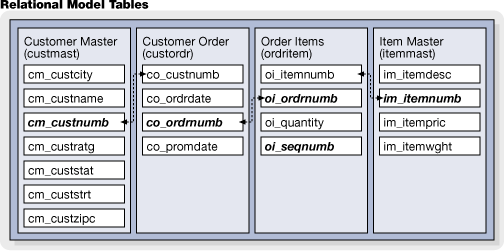
- Initialize() - Connects to the FairCom Database Engine.
- Define() - Defines and creates the "custmast", "custordr", "ordritem" and the "itemmast" tables/files with related indexes.
- Manage() - Adds some related rows/records to all tables/files. Then queries the database.
- Done() - Disconnects from FairCom Database Engine.
Note our simple Main() function:
import java.sql.*;
import java.io.*;
public class JDBC_Tutorial2 {
static Connection conn;
static Statement stmt;
//
// main()
//
// The main() function implements the concept of "init, define, manage
// and you're done..."
//
public static void main (String[] args)
throws java.io.IOException
{
Initialize();
Define();
Manage();
Done();
System.out.print("\nPress <ENTER> key to exit . . .");
System.in.read();
System.exit(0);
}
We suggest opening the source code with your own editor.
Continue now to review these four steps.
Init

First we need to open a connection to a database by providing the FairCom Database Engine with a user name, password and the database name.
Below is the code for Initialize():
//
// Initialize()
//
// Perform the minimum requirement of logging onto the c-tree Server
//
private static void Initialize ()
{
System.out.println("INIT");
try
{
// load the driver
Class.forName ("ctree.jdbc.ctreeDriver");
// connect to server
System.out.println("\tLogon to server...");
conn = DriverManager.getConnection ("jdbc:ctree://localhost:6597/ctreeSQL", "ADMIN", "ADMIN");
// create statement handles
stmt = conn.createStatement();
}
catch (SQLException e)
{
Handle_Exception(e);
}
catch (Exception e)
{
Handle_Exception(e);
}
}
Define

Define() establishes specific data definitions. This involves defining columns/fields and creating the tables/files with optional indexes.
Below is the code for Define():
//
// Define()
//
// Create the tables
//
private static void Define ()
{
System.out.println("DEFINE");
try
{
stmt.executeUpdate("DROP TABLE ordritem");
}
catch (SQLException e)
{
}
try
{
stmt.executeUpdate("DROP TABLE custordr");
}
catch (SQLException e)
{
}
try
{
stmt.executeUpdate("DROP TABLE itemmast");
}
catch (SQLException e)
{
}
try
{
stmt.executeUpdate("DROP TABLE custmast");
}
catch (SQLException e)
{
}
Create_CustomerMaster_Table();
Create_CustomerOrders_Table();
Create_OrderItems_Table();
Create_ItemMaster_Table();
}
//
// Create_CustomerMaster_Table()
//
// Create the table CustomerMaster
//
private static void Create_CustomerMaster_Table ()
{
// define table CustomerMaster
System.out.println("\ttable CustomerMaster");
try
{
stmt.executeUpdate("CREATE TABLE custmast (" +
"cm_custnumb CHAR(4), " +
"cm_custzipc CHAR(9), " +
"cm_custstat CHAR(2), " +
"cm_custrtng CHAR(1), " +
"cm_custname VARCHAR(47), " +
"cm_custaddr VARCHAR(47), " +
"cm_custcity VARCHAR(47))"
);
}
catch (SQLException e)
{
Handle_Exception(e);
}
try
{
stmt.executeUpdate("CREATE UNIQUE INDEX cm_custnumb_idx ON custmast (cm_custnumb)");
}
catch (SQLException e)
{
Handle_Exception(e);
}
}
//
// Create_CustomerOrders_Table()
//
// Create the table CustomerOrders
//
private static void Create_CustomerOrders_Table ()
{
// define table CustomerOrders
System.out.println("\ttable CustomerOrders");
try
{
stmt.executeUpdate("CREATE TABLE custordr (" +
"co_ordrdate DATE, " +
"co_promdate DATE, " +
"co_ordrnumb CHAR(6), " +
"co_custnumb CHAR(4))"
);
}
catch (SQLException e)
{
Handle_Exception(e);
}
try
{
stmt.executeUpdate("CREATE UNIQUE INDEX co_ordrnumb_idx ON custordr (co_ordrnumb)");
stmt.executeUpdate("CREATE INDEX co_custnumb_idx ON custordr (co_custnumb)");
}
catch (SQLException e)
{
Handle_Exception(e);
}
}
//
// Create_OrderItems_Table()
//
// Create the table OrderItems
//
private static void Create_OrderItems_Table ()
{
// define table OrderItems
System.out.println("\ttable OrderItems");
try
{
stmt.executeUpdate("CREATE TABLE ordritem (" +
"oi_sequnumb SMALLINT, " +
"oi_quantity SMALLINT, " +
"oi_ordrnumb CHAR(6), " +
"oi_itemnumb CHAR(5))"
);
}
catch (SQLException e)
{
Handle_Exception(e);
}
try
{
stmt.executeUpdate("CREATE UNIQUE INDEX oi_ordrnumb_idx ON ordritem (oi_ordrnumb, oi_sequnumb)");
stmt.executeUpdate("CREATE INDEX oi_itemnumb_idx ON ordritem (oi_itemnumb)");
}
catch (SQLException e)
{
Handle_Exception(e);
}
}
//
// Create_ItemMaster_Table()
//
// Create the table ItemMaster
//
private static void Create_ItemMaster_Table ()
{
// define table ItemMaster
System.out.println("\ttable ItemMaster");
try
{
stmt.executeUpdate("CREATE TABLE itemmast (" +
"im_itemwght INTEGER, " +
"im_itempric MONEY, " +
"im_itemnumb CHAR(5), " +
"im_itemdesc VARCHAR(47))"
);
}
catch (SQLException e)
{
Handle_Exception(e);
}
try
{
stmt.executeUpdate("CREATE UNIQUE INDEX im_itemnumb_idx ON itemmast (im_itemnumb)");
}
catch (SQLException e)
{
Handle_Exception(e);
}
}
Manage

Manage() provides data management functionality for your application and/or process.
Below is the code for Manage():
//
// Manage()
//
// Populates table and perform a simple query
//
private static void Manage ()
{
System.out.println("MANAGE");
// populate the tables with data
Add_CustomerMaster_Records();
Add_CustomerOrders_Records();
Add_OrderItems_Records();
Add_ItemMaster_Records();
// perform a query:
// list customer name and total amount per order
// name total
// @@@@@@@@@@@@@ $xx.xx
// for each order in the CustomerOrders table
// fetch order number
// fetch customer number
// fetch name from CustomerMaster table based on customer number
// for each order item in OrderItems table
// fetch item quantity
// fetch item number
// fetch item price from ItemMaster table based on item number
// next
// next
System.out.println("\n\tQuery Results");
try
{
ResultSet rs = stmt.executeQuery (
"SELECT cm_custname, SUM(im_itempric * oi_quantity) " +
"FROM custmast, custordr, ordritem, itemmast " +
"WHERE co_custnumb = cm_custnumb AND co_ordrnumb = oi_ordrnumb AND oi_itemnumb = im_itemnumb " +
"GROUP BY co_ordrnumb, cm_custname");
// read resultset
while (rs.next())
{
// fetch customer name
String custname = rs.getString(1);
// fetch item price
float total = rs.getFloat(2);
System.out.println("\t\t" + custname + "\t" + total);
}
rs.close();
}
catch (SQLException e)
{
Handle_Exception(e);
}
}
//
// Add_CustomerMaster_Records()
//
// This function adds records to table CustomerMaster from an
// array of strings
//
private static void Add_CustomerMaster_Records ()
{
System.out.println("\tAdd records in table CustomerMaster...");
String data[] = {
"('1000','92867','CA','1','Bryan Williams','2999 Regency','Orange')",
"('1001','61434','CT','1','Michael Jordan','13 Main','Harford')",
"('1002','73677','GA','1','Joshua Brown','4356 Cambridge','Atlanta')",
"('1003','10034','MO','1','Keyon Dooling','19771 Park Avenue','Columbia')"
};
Delete_Records("custmast");
try
{
// add one record at time to table
for (int i = 0; i < data.length; i++) {
stmt.executeUpdate("INSERT INTO custmast VALUES " + data[i]);
}
}
catch (SQLException e)
{
Handle_Exception(e);
}
}
//
// Add_CustomerOrders_Records()
//
// This function adds records to table CustomerOrders from an
// array of strings
//
private static void Add_CustomerOrders_Records ()
{
System.out.println("\tAdd records in table CustomerOrders...");
String data[] = {
"('09/01/2002','09/05/2002','1','1001')",
"('09/02/2002','09/06/2002','2','1002')"
};
Delete_Records("custordr");
try
{
// add one record at time to table
for (int i = 0; i < data.length; i++) {
stmt.executeUpdate("INSERT INTO custordr VALUES " + data[i]);
}
}
catch (SQLException e)
{
Handle_Exception(e);
}
}
//
// Add_OrderItems_Records()
//
// This function adds records to table OrderItems from an
// array of strings
//
private static void Add_OrderItems_Records ()
{
System.out.println("\tAdd records in table OrderItems...");
String data[] = {
"(1,2,'1','1')",
"(2,1,'1','2')",
"(3,1,'1','3')",
"(1,3,'2','3')"
};
Delete_Records("ordritem");
try
{
// add one record at time to table
for (int i = 0; i < data.length; i++) {
stmt.executeUpdate("INSERT INTO ordritem VALUES " + data[i]);
}
}
catch (SQLException e)
{
Handle_Exception(e);
}
}
//
// Add_ItemMaster_Records()
//
// This function adds records to table ItemMaster from an
// array of strings
//
private static void Add_ItemMaster_Records ()
{
System.out.println("\tAdd records in table ItemMaster...");
String data[] = {
"(10,19.95,'1','Hammer')",
"(3, 9.99,'2','Wrench')",
"(4, 16.59,'3','Saw')",
"(1, 3.98,'4','Pliers')"
};
Delete_Records("itemmast");
try
{
// add one record at time to table
for (int i = 0; i < data.length; i++) {
stmt.executeUpdate("INSERT INTO itemmast VALUES " + data[i]);
}
}
catch (SQLException e)
{
Handle_Exception(e);
}
}
//
// Delete_Records()
//
// This function deletes all the records in a tables
//
private static void Delete_Records (String table)
{
System.out.println("\tDelete records...");
try
{
stmt.executeUpdate("DELETE FROM " + table);
}
catch (SQLException e)
{
Handle_Exception(e);
}
}
Done

When an application and/or process has completed operations with the database, it must release resources by closing the open files and disconnecting from the database engine.
Below is the code for Done():
//
// Done()
//
// This function handles the housekeeping of closing, freeing,
// disconnecting and logging out of the database
//
private static void Done ()
{
System.out.println("DONE");
try
{
stmt.close();
// logout
System.out.println("\tLogout...");
conn.close();
}
catch (SQLException e)
{
Handle_Exception(e);
}
}
Additional Resources
We encourage you to explore the additional resources listed here:
- Complete source code for this tutorial can be found in JDBC_Tutorial2.java in your installation directory, within the <faircom>\drivers\sql.jdbc\tutorials directory for your platform.
- Additional documentation may be found on the FairCom Web site at: www.faircom.com