
This chapter describes the c-treeSQL database load utility, dbload. This utility loads records from an input data file into tables of a database. The format of the data file is specified by a record description given in an input commands file to dbload.
The commands files of both dbload and dbdump use DEFINE RECORD statements with similar syntax to specify the format of loaded or exported data records. The commands files specify the data file, the format of data records, and the destination (or source) database columns and tables for the data.
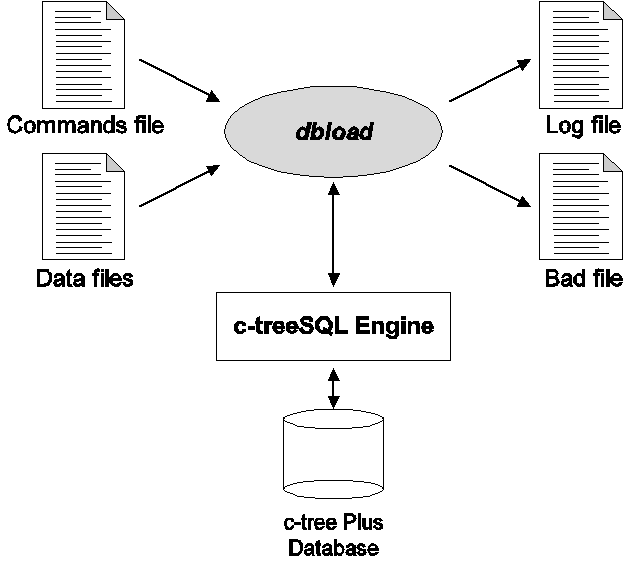
The dbload utility allows loading of variable- or fixed-length records, and lets the load operation specify the set of fields and records to be stored from an input file. Data files can use multiple-character record delimiters. dbload also allows control of other characteristics, such as error handling and logging, in its command line. dbload generates a badfile that contains records from the input file that failed to load in the database.
The following figure shows the dbload execution process.
Prerequisites for dbload
Before running dbload, you need:
- A valid, readable commands file
- INSERT privileges on the tables named in the commands file
dbload Command-Line Syntax
The dbload command does not directly specify an input file, but instead names a commands file that in turn specifies data input files. The dbload command accepts the commands file name, the database name, and a list of command options.
Syntax
dbload -f commands_file [ options ] database_name
- -f commands_file - Specifies the file containing dbload commands.
- options - One or more of the options as described below
- database_name - Name of the database, including the complete reference to the c-tree server:
[port@] [server machine name | ip : ]database_name
Options
- -u user_name - The user name c-treeSQL uses to connect to the database. If omitted, the default value depends on the environment. (On UNIX, the value of the DH_USER environment variable specifies the default user name. If DH_USER is not set, the value of the USER environment variable specifies the default user name.)
- -a password - The password c-treeSQL uses to connect to the database. If omitted, the default value depends on the environment. (On UNIX, the value of the DH_PASSWD environment variable specifies the default password.)
- -z maximum multiple inserts - The maximum number of records to be inserted at one time in each bulk insert (used to improve performance)
- -l logfile - Specifies the file into which the error logging is done. stderr is the default. dbload also writes statistics to the file:
- Number of records read
- Number of records skipped
- Number of records loaded
- Number of records rejected
- -b badfile - The file into which the bad rows that were not loaded, are written. By default badfile is put in the current directory.
- -c commit_frequency - Store the specified number of records before committing the transaction. The default frequency is 100 records.
- -e maxerrs - The maximum number of tolerable errors. The default number is 50 errors.
- -s skipcount - Skip the specified number of rows in the first data file. If multiple files are specified, the rows are skipped only in the first file. The default number is zero rows.
- -m maxrows - Stop storing rows at the specified number.
- -n - Parse the commands file and display errors, if any, without doing the database load. If the parsing is successful, the following message displays on stdout: "No errors in the commands file."
- -S BASIC | <cert_filename> - Basic TLS encryption or cross checked authentication using <cert_filename>
Unicode
The dbdump Data Unload and dbload Data Load utilities properly dump and load data out of a Unicode-enabled FairCom DB SQL Server. The commands file must be in ASCII format. The output file generated by dbdump is in Unicode format with an optional Byte Order Mark (BOM) indicating the Unicode encoding form (using the ‑B command-line switch).
The input file for dbload needs to be in Unicode (native "wchar" encoding form) with an optional BOM, in which case the utilities check for the proper format.
Data File Formats
Data files must be in one of the following record formats:
- Variable-length records
- Fixed-length records
For both these types of records, an optional field delimiter and an optional record delimiter can be specified. The field delimiter, when specified, should be a single character. By default, comma is the field delimiter. The record delimiter can be specified in the commands file and it can be more than one character. By default, the newline character, \n, is the record delimiter.
String Formatting Qualifiers
It is common for CSV files to surround string fields with a qualifier (typically a double quotation mark: "string"). dbload does not support string qualifiers. It is necessary remove all string qualifiers from the CSV.
In some cases, a string field includes the same character used as a field delimiter. For example, these three fields use a comma as a delimiter:
"6300 W Sugar Creek Drive, Columbia", "MO", "USA"
A comma also appears in the first field "6300 W Sugar Drive, Columbia". When the string qualifiers are removed, this field appears to be two fields.
6300 W Sugar Creek Drive, Columbia, MO, USA
In this case, the field delimiter must be changed to a character that does not appear in the string, for example, a semi-colon (;):
6300 W Sugar Creek Drive, Columbia; MO; USA
Variable-Length Records
For variable-length records, the fields in the data file can be of varying length. Unless the keyword FIXED is used in the commands file, it is assumed that the dbload record processing will be for variable-length records.
Fixed-Length Records
For fixed-length records, the fields in the data file must be of fixed length. The length of the record must be the same for all records and is specified in the commands file. In case of fixed-length records, the field and record delimiters are ignored. That is, the POSITION specification must be such that the delimiters are ignored.
The data files that contain fixed-length records can either be ASCII or binary files.
The Commands File
The commands file specifies instructions for dbload to load the records into the table specified. Thus the commands file defines what dbload will be performing for a particular loading process.
There is no file naming convention for the commands file. For example, the commands file name to load the ORDERS table could be ORDERS_CMD.
The commands file must contain the following parts:
- The DEFINE RECORD statement
- The FOR EACH statement
The syntax definition for the commands file is as shown:
dbload_commands:
define_record_statement
for_each_statement
The following is sample commands file showing load instructions.
DEFINE RECORD ord_rec AS
( ord_no, item_name, date, item_qty ) FIELD DELIMITER ' ' ;
FOR EACH RECORD ord_rec FROM ord_in
INSERT INTO ADMIN.orders (order_no, product, order_date, qty)
VALUES (ord_no, item_name, date, item_qty) ;
NEXT RECORD
The above commands specification instructs dbload to load records into the orders table. The fields in the data file, ORD_IN, appear in the order listed in the DEFINE RECORD statement.
The DEFINE RECORD Statement
The DEFINE RECORD statement is used to define the record that is to be loaded into the database. It describes the data found in the data file. The following are the definitions that are made known by the DEFINE RECORD statement:
- Names the record to be loaded
- Names the fields of the record to be loaded as found in the data file
- Specifies whether the records in the data file are variable length records or fixed length records
- If fixed length records, specifies the position and data type of the field
The following is the syntax definition of the DEFINE RECORD statement:
DEFINE RECORD record_name
[ OF FIXED LENGTH record_length
AS (
field_name position_specification type_specification, ...
)
]
AS (
field_name, ...
)
[ FIELD DELIMITER delimiter_char ]
[ RECORD DELIMITER delimiter_string ] ;
position_specification::
POSITION ( start_position : end_position )
type_specification::
CHAR
| SHORT
| LONG
| FLOAT
| DOUBLE
The following are the variable descriptions of the DEFINE RECORD syntax:
- record_name is the name used to refer to the records found in the data file.
- record_length is the length of the fixed length record. This length should include the length of field or record delimiters, if any.
- field_name is the name used to refer to a field in the data file.
- delimiter_char is the field delimiter and is a single character. It must be specified as a literal.
- delimiter_string is the record delimiter and can be a single character or a string. It must be specified as a literal.
- start_position is the position where the field starts. It must be an unsigned integer.
- end_position is the position where the field ends. It must be an unsigned integer.
The first position of each record is 1 and not 0.
If date and time types are to be inserted they can be specified as characters in the data file. If it is a fixed length record then the type specification can be CHAR.
The following is an example of the DEFINE RECORD statement for fixed length records:
DEFINE RECORD rec_one OF FIXED LENGTH 20
AS (
fld1 POSITION (1:4) SHORT,
fld2 POSITION (5:15) CHAR,
fld3 POSITION (16:20) CHAR
) ;
The FOR EACH Statement
The FOR EACH statement scans for each valid record in the data file and inserts the record into the database. The syntax for the FOR EACH statement is shown below:
FOR EACH RECORD record_name FROM "data_file_name", ...
INSERT INTO owner_name.target_table [ (field_name, ...) ]
VALUES (value, ...) ;
NEXT RECORD
The following are the variable descriptions of the FOR EACH statement:
- record_name is the record name that is specified in the DEFINE RECORD statement.
- data_file_name is the name of the input data file name. The file name must be enclosed in double quotation marks, for example: "myfile"
- owner_name.target_table is the target table name identified along with the owner name of the table. The target_table must already exist in the database and must have appropriate permissions for inserting the records.
- field_name is the name of the field or column in the table.
- value is the value that must be inserted into the table.
The target_table can also be a synonym on another table with the INSERT access. The list of values that are to be inserted must follow the VALUES keyword. The values that can be inserted are:
- Name of the field in the input data file
- A constant (both numeric as well as character)
- NULL
The values specified in the VALUES list must correspond one to one with that in the target table list. The list can be in any order compared to the list specified in the DEFINE RECORD statement. The following example shows the list interchanged with respect to the list in the DEFINE RECORD statement.
DEFINE RECORD dept_rec AS
( dept_no, dept_name, location ) FIELD DELIMITER ' ' ;
FOR EACH RECORD dept_rec FROM dept_in
INSERT INTO ADMIN.department (loc, no, name)
VALUES (location, dept_no, dept_name) ;
NEXT RECORD
Here the items no, name, and loc are interchanged in both the table list and the values list when compared with the DEFINE RECORD list.
The keyword NEXT RECORD must be specified after the FOR EACH statement so that the insert loop is terminated.
Examples
This section gives different types of examples for dbload, both for variable length records as well as fixed length records. The data files can either be ASCII or binary files. If they are binary files they must be in the fixed length record format.
The following example is the commands file to load records into the DEPT table. The input data file name is deptrecs_in which is an ASCII file in the variable length record format.
Example 1:
This example is showing an ASCII input file called name_in.txt that is using the '^' as it's field delimeter. The table "name" in this example has 3 columns:
name_number CHAR 8
name CHAR 47
gender CHAR 1
The commands.txt file is:
DEFINE RECORD name_rec AS
( name_number, name, gender ) FIELD DELIMITER '^' ;
FOR EACH RECORD name_rec FROM "name_in.txt"
INSERT INTO name (name_number, name, gender)
VALUES (name_number, name, gender) ;
NEXT RECORD
The name_in.txt file is:
1^James Smith^m
2^James Johnson^m
3^James Williams^m
4^James Brown^m
5^James Jones^m
6^James Miller^m
7^James Davis^m
8^James Garcia^m
9^James Rodriguez^m
10^James Wilson^m
The syntax for the dbload.exe command is:
dbload.exe -f commands.txt -u admin -a ADMIN 6597@localhost:ctreeSQL
Example 2:
DEFINE RECORD dept_rec AS
( dept_no, dept_name, location ) FIELD DELIMITER ' ' ;
FOR EACH RECORD dept_rec FROM deptrecs_in
INSERT INTO ADMIN.dept (no, name, loc)
VALUES (dept_no, dept_name, location) ;
NEXT RECORD
Example 3:
The following is the commands file to load records into the CUSTOMER table. The input data file is cust_in which is a binary file in the fixed length record format.
DEFINE RECORD cust_rec OF FIXED LENGTH 36
AS (
cust_no POSITION (1:4) LONG,
cust_name POSITION (5:15) CHAR,
cust_street POSITION (16:28) CHAR,
cust_city POSITION (29:34) CHAR,
cust_state POSITION (35:36) CHAR
) ;
FOR EACH RECORD cust_rec FROM cust_in
INSERT INTO ADMIN.customer (no, name, city, street, state)
VALUES (cust_no, cust_name, cust_city, cust_street, 'CA') ;
NEXT RECORD
Example 4:
The following is the commands file to load records into the ORDERS table. The input data file is orders_in which is a binary file in the fixed length record format.
DEFINE RECORD orders_rec OF FIXED LENGTH 30
AS (
order_no POSITION (1:4) LONG,
order_date POSITION (6:16) CHAR,
product POSITION (18:25) CHAR,
qty POSITION (27:30) LONG
) ;
FOR EACH RECORD orders_rec FROM orders_in
INSERT INTO ADMIN.orders (no, date, prod, units)
VALUES (order_no, order_date, product, qty) ;
NEXT RECORD
dbload Errors
This section discusses the different types of errors that can occur during the execution of dbload.
There are three types of errors that can occur during the dbload execution process:
- Commands file errors
- dbload errors
- FairCom DB SQL database errors
The invalid records that are encountered during the processing of records from the data files are flagged as bad records and are written to the badfile that is specified in the dbload command option. By default, the bad records are written to the file, badfile, in the current directory. Any error in the input data file is messaged in the log file (if specified in the command line option) along with the statistics. The following sections discuss the compilation errors and fatal errors that could occur during the dbload process execution.
Compilation Errors
The compilation error messages are as follows:
Record name redefined.
The record name in the DEFINE RECORD statement was already defined. The record name must be unique. dbload creates a new definition using the same name.
Error in record definition.
Too many fields in record definition.
The number of fields used in the record definition is more than the maximum allowed. Currently, the maximum number allowed is TPE_MAX_FIELDS in the header file sql_lib.h.
Position not specified for fixed length record.
Position for SHORT not specified correctly.
The size of the field (start position to end position) must be equal to the size of SHORT.
Position for LONG not specified correctly.
The size of the field (start position to end position) must be equal to the size of LONG.
Position for FLOAT not specified correctly.
The size of the field (start position to end position) must be equal to the size of FLOAT.
Position for DOUBLE not specified correctly.
The size of the field (start position to end position) must be equal to the size of DOUBLE.
Field delimiter must be a single character.
Invalid record delimiter.
Record not defined.
The FOR EACH statement is used with a record name that is not defined.
Mismatch in value list.
The number of values specified in the VALUES list does not match with that specified in the DEFINE RECORD list.
Too many data files specified.
Currently, the maximum number of data files that can be specified in a FOR EACH statement is 10.
Column not found in record definition.
Fatal Errors
The following are a list of nonrecoverable errors.
- No memory
- Table not found
- No columns in the table
- Column not found
- Too many fields
- More than the maximum number of fields allowed, is specified in the table list of the FOR EACH statement.
- Cannot open <bad file name>
- Cannot open <data file name>
- Cannot open log file <log file name>
The dbload execution process can also stop if the number of tolerable errors specified (-e option) on the command option is exceeded. By default the number of tolerable errors is 50.